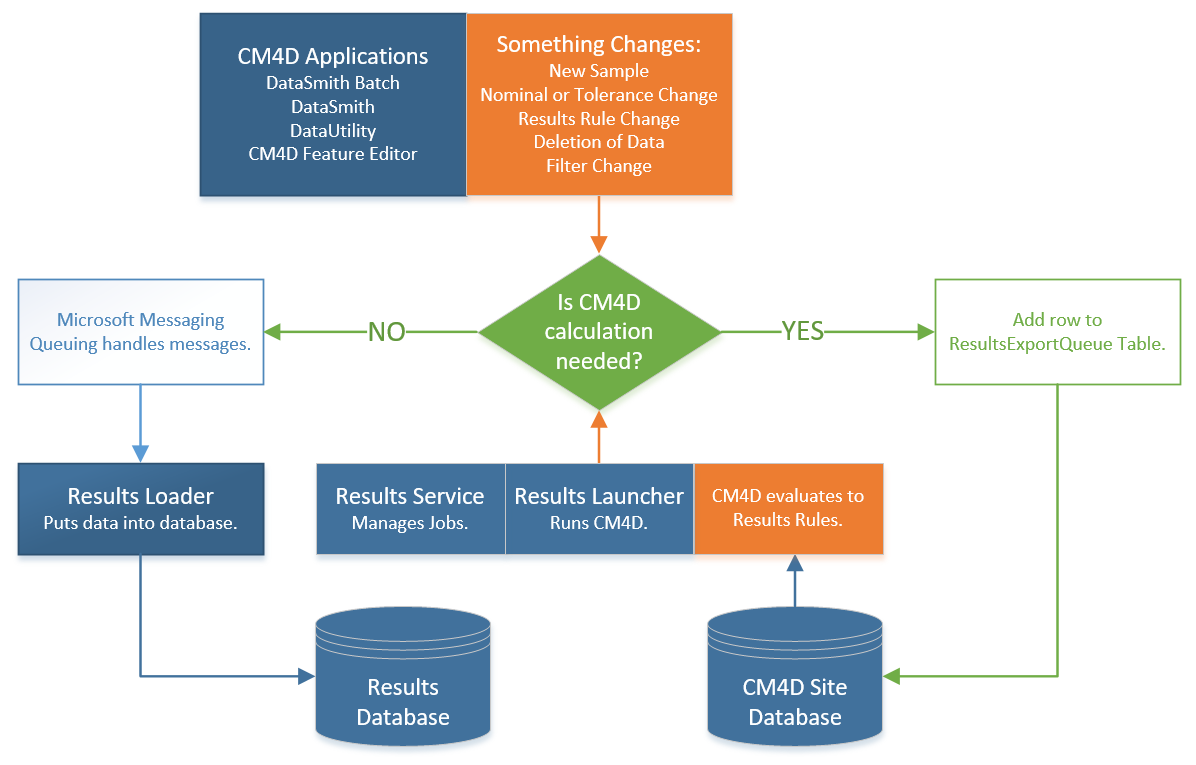
Results Data Flow - Services

In this topic: Hide


Synchronizing Data Changes

When data changes in CM4D, those changes must be synchronized with the Results database. Any change to a value can result in an update to the results database. The change can occur anywhere in CM4D. For example, changes to the Nominals or Tolerances in the Feature Editor.

Routes of Data Changes

There are two paths for data to take through the system when a change is made:

1.     Calculation Required - Changed data is sent through CM4D for calculations and Results are updated.

2.     No Calculation Required - Data is sent to the Results database via the MSMQ.

Direct Path - No Calculation Required

CM4D Path - Calculation Required

Examples:

·        Create/Update Routine

·        Change Filter Value

·        Delete Sample/Feature/Routine

·        Add Feature

·        Only uses MSMQ and Results Loader

·        Almost instantaneous

·        Only updates Routine, Samples and Features

·        Can delete from Processes and Results

Examples:

·        Add or Modify Samples

·        Change Nominals/Tolerances

·        Change Results Rules

·        Creates Results Export Message

·        Service Uses Launcher and CM4D to perform Evaluation

·        Much slower

·        Updates Processes and Results

Export Queue Performance Tuning

See the topic Results Export Queue.