EventSmith Services - v25.1 Archive
EventSmith utilizes two Windows services (DataConnect and EventSmith), but it uses the EventSmith interface in CM4D Web to subscribe users to Events. The two services that run EventSmith SMTP must be configured before you can start the services.
EventSmith SMTP Service
The EventSmith SMTP service is the notification service that connects EventSmith to the mail server.
Dependencies: DataConnect Service
User Requirements:
- General
Startup Requirements:
- EventSmith SMTP service configuration file
- Mail Server configuration
DataConnect Service
The Data Connect service is the communication service to ATS data structures. For CM4D, it connects the mail server to CM4D-generated events.
Dependencies:
- none
User Requirements:
- General
Startup Requirements:
- DataConnect service configuration file
- Mail Server configuration
EventSmith Services Configuration
The primary configuration for these services is done via the CM4D Configuration plugin (ATS Security and Configuration Manager).
See the topic EventSmith Settings for details.
Alternately, the configuration can be done by manually modifying the configuration files for each service.
Manual Configuration StepsManual Configuration Steps
EventSmith Services Configuration
- Run Site Manager and go to Settings > EventSmith SMTP Settings menu.
- Configure the following:
- SMTP Host - The server address of the SMTP mail server.
- Port - The port number used to connect to the SMTP mail server. It must match the SMTP port used on your mail server.
- Enable SSL - Check this option only if the mail server requires SSL.
- Username - The username that will be used to log in to Authenticate on the mail server. For anonymous relay, leave this empty.
- Password - The password for the Authentication user name. For anonymous relay, leave this empty. The password is encrypted in the database.
- From Address - The email address from which the event notifications are sent. If this is left empty, EventSmith will attempt to obtain an address from the Site database based on the user running the service. If neither exist, the service will not start. If you are using Authentication, the from address should match the account used to log in to the SMTP server or it will likely fail to send any email.
- Click OK
- Configure the following:
- Edit the file ATS.CM4D.DataConnect.Host.exe.config.
- Set the DataConnect service host information:
- <add baseAddress="net.tcp://server98:8523/CM4DDB_Service"/>
- Service Server - Enter the name of the server that is hosting the DataConnect service.
- Service Port - Enter the port number used by the DataConnect host server to connect to the EventSmith host server (it must be the same as the port set in the EventSmith config).
- <add baseAddress="net.tcp://server98:8523/CM4DDB_Service"/>
- Save the config file.
- Set the DataConnect service host information:
- Edit the file ATS.CM4D.EventSmith.SMTP.exe.config.
- Set the EventSmith service host information:
- <endpoint address="net.tcp://server98:8523/CM4DDB_Service" binding="netTcpBinding" bindingConfiguration="NetTcpBinding_ICM4DDB" contract="CM4DDB_ServiceRef.ICM4DDB" name="NetTcpBinding_ICM4DDB">
- Service Host - Enter the name of the server that is hosting the DataConnect service.
- Service Port - Enter the port number used by the EventSmith SMTP client server to connect to the DataConnect host server (it must be the same as the port set in the DataConnect config).
- <endpoint address="net.tcp://server98:8523/CM4DDB_Service" binding="netTcpBinding" bindingConfiguration="NetTcpBinding_ICM4DDB" contract="CM4DDB_ServiceRef.ICM4DDB" name="NetTcpBinding_ICM4DDB">
- Optional - Set the Queue options:
- QueueRefreshSeconds - The time in seconds when the EventSmith queue is checked for entries. The default value is 10; this must be a number between 10 and 86400
- QueueRetrievalSize - The number of EventSmith queue entries picked up each time the queue is refreshed. The default value is 2.
- Optional - Set the Console, Event or File logging levels:
- level - Enter a logging level (OFF, ERROR, INFO, DEBUG).
- Save the config file.
- Set the EventSmith service host information:
- Set the user login for the two services, EventSmith SMTP and DataConnect.
- Start the DataConnect service.
- Start the EventSmith SMTP service.
DataConnect Service Configuration
Edit the file ATS.CM4D.DataConnect.Host.exe.config.
Set the event email information:
<smtp from="[email protected]">
SMTP From - Enter the user email address from which the event notifications are sent. This user appears in the "From" field in the email.
Set the SMTP server information:
<network host="your.smtp.server.name" port="25" userName="user" password="password" enableSsl="false"/>
Mail Server- Enter the server address of the SMTP mail server.
Mail Server Port - The port number used to connect to the SMTP mail server. It must match the SMTP port used on your mail server.
SMTP Authentication Type - Pick one of the two authentication types as corresponds to your mail server.
With Authentication
userName="user" password="password"
Mail User Name - The email of the user who will be used to log in to Authenticate on the mail server.
Mail User Password - The password for the Authentication user name.
Without Authentication (Anonymous Relay)
userName="" password=""
Mail User Name - Leave empty/blank.
Mail User Password - Leave empty/blank.
Set the Database connection information. Pick one method, either SQL or Windows Authentication:
SQL Authentication
<add name="CM4DSiteConnString" connectionString="Data Source=DB_ServerName\instance;Initial Catalog=SiteDBName;User Id=siteUser;Password=userPassword;multipleactiveresultsets=True;" providerName="System.Data.SqlClient"/>
CM4D Db Server - Enter the name of the database server. If using a Named Instance, include this in the server name.
CM4D Site Database - Enter the CM4D Site database name.
SQL User ID - Enter the name of the SQL Authentication user for the CM4D Site database.
SQL User Password - Enter the password for the SQL user.
Windows authentication
<add name="CM4DSiteConnString" connectionString="Data Source=DB_ServerName\instance;Initial Catalog=SiteDBName;Persist Security Info=True;Integrated Security=True" providerName="System.Data.SqlClient" />
CM4D Db Server - Enter the name of the database server. If using a Named Instance, include this in the server name.
CM4D Site Database - Enter the name of the CM4D Site database.
Set the DataConnect service host information:
<add baseAddress="net.tcp://server98:8523/CM4DDB_Service"/>
Service Server - Enter the name of the server that is hosting the DataConnect service.
Service Port - Enter the port number used by the DataConnect host server to connect to the EventSmith host server (it must be the same as the port set in the EventSmith config).
Save the config file.
EventSmith SMTP Configuration File
The EventSmith SMTP Config file (ATS.CM4D.EventSmith.SMTP.exe.config) is the configuration file for the ATS CM4D EventSmith SMTP service. It contains the logging settings and the connection information to the Host Service. This config file is included in the CM4D installation folder. Default path:Default path:
See as XML TagsSee as XML Tags
| Parent Node | Tag | Description | Content | Attribute | Attribute Description | Valid Attribute Values |
| <configuration> | ||||||
| <appSettings> | <add> | key | QueueRefreshSeconds QueueRetrievalSize |
|||
| value | 1-60 integer |
|||||
| <client> | <endpoint> | address | The server address of the DataConnect service host, including the port number. This must match in both the DataConnect and EventSmith configurations. | |||
| <configuration> | <appSettings> | Set Queue intervals. | ||||
| <LogConfiguration> | Set the level and location for logging information. | |||||
| <LogConfiguration> | <consoleLog> | Logging information for EventSmith SMTP is logged to the console. | level | OFF = Logging
disabled. ERROR = Log error and fatal messages. INFO = Log info, warning, error and fatal messages. DEBUG = Log debug, info, warning, error and fatal messages. |
||
| <eventLog> | Logging information for EventSmith SMTP is logged to the Windows event logger. | level | ||||
| <rollingFileLog> | This option is not available. |
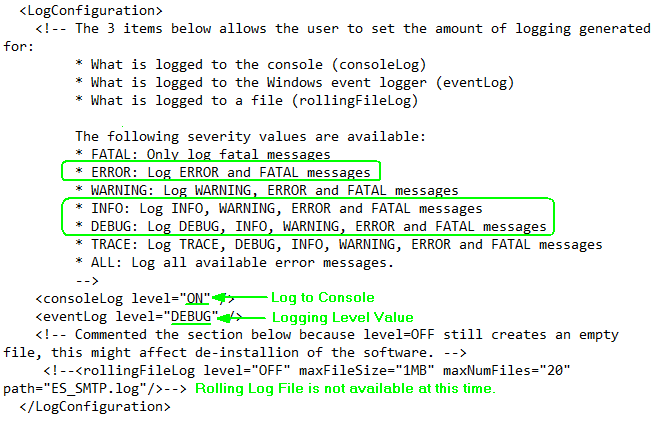
Log Configuration
Set the following:
- consoleLog - Logging information for EventSmith SMTP is logged to the console; set to OFF, ERROR, INFO or DEBUG.
- eventLog - Logging information for EventSmith SMTP is logged to the Windows event logger; set to OFF, ERROR, INFO or DEBUG.
- rollingFileLog - This option is not available.
Valid logging severity values:
- "OFF" - Logging disabled.
- "ERROR" - Log error and fatal messages.
- "INFO" - Log info, warning, error and fatal messages.
- "DEBUG" - Log debug, info, warning, error and fatal messages.
Example of Log Configuration
Client
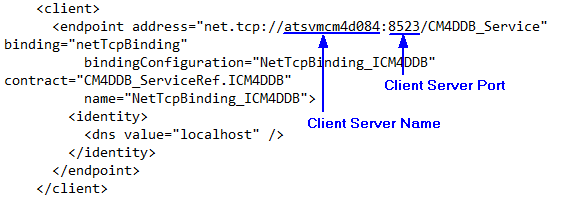
Set the following:
- address - Enter the name of the server that is hosting the DataConnect service and the port number used by the EventSmith SMTP client server to connect to the DataConnect host server (it must be the same as the port set in the Host Address).
Example of Client Configuration
DataConnect Configuration File
The Host Config file is the configuration file for the ATS DataConnect service. It contains the connection information for the mail server and the CM4D Site Database. This config file is included in the CM4D installation folder. Default path:Default path:
Mail Settings
It is recommended to configure these settings via CM4D Configuration EventSmith Settings.
This section of the config file is where you enter the settings for your SMTP server connection. If you will be using Authentication, this is also where the credentials are set. Depending on your server type, configure using one of the following options.
Once the service is started, you can look at the entries in the Windows Event Viewer to see which mode (authentication or anonymous) is running.
Option 1 - SMTP with Authentication
Use this option if you are using an SMTP server that requires authentication. Set the following:
- from - The user email address from which the event notifications are sent. This user appears in the "From" field in the email.
- host - The server address of the SMTP mail server.
- password - The password for the Authentication user name.
- port - The port number used to connect to the SMTP mail server. It must match the SMTP port used on your mail server.
- userName - The email of the user who will be used to log in to Authenticate on the mail server.
Example of Option 1

Option 2 - SMTP with Anonymous Relay
Use this option if you are using an SMTP server that does not require authentication. Set the following:
- from - The user email address from which the event notifications are sent. This user appears in the "From" field in the email.
- host - The server address of the SMTP mail server.
- password - Leave blank.
- port - The port number used to connect to the SMTP mail server. It must match the SMTP port used on your mail server.
- userName - Leave blank.
Example of Option 2

Connection Strings
This section of the config file is where you enter the database settings to connect to your CM4D Site database. The DataConnect service may connect to the CM4D database using either SQL or Windows Authentication. Depending on your connection type, configure using one of the following options.
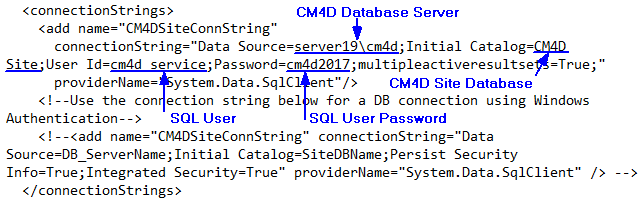
Option 1 - CM4D Site Database Connection with SQL Authentication
To connect to a database that uses SQL Authentication, configure this section. This is the default enabled option. Set the following:
- Data Source - The name of the server hosting the CM4D database. Include the instance name if applicable.
- Initial Catalog - The name of the CM4D Site Database.
- User Id - The name of the SQL Authentication user for the CM4D Site database.
- Password - The password of the SQL Authentication user.
Example of Option 1
Option 2 - CM4D Site Database Connection with Windows Authentication
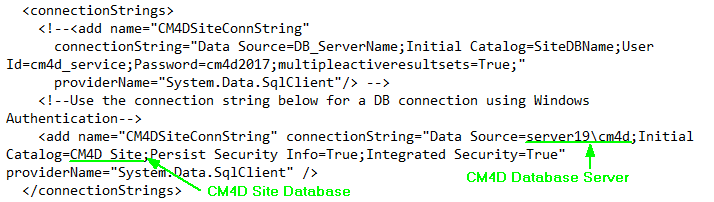
To connect to a database that uses Windows Authentication, comment out the previous section for SQL Authentication and use this section. This is not the default enabled option. Set the following:
- Data Source - The name of the server hosting the CM4D database. Include the instance name if applicable.
- Initial Catalog - The name of the CM4D Site Database.
- Persist Security Info = True (do not modify)
- Integrated Security = True (do not modify)
Example of Option 2
Host
This section is to set the server name and port for the DataConnect service. The host information here must match the client endpoint information in the EventSmith configuration file. Set the following:
baseAddress - enter the name of the server that is hosting the DataConnect service and the port number used by the DataConnect host server to connect to the EventSmith host server (the port must be the same as the port set in the Client Address in the EventSmith configuration file).
Configuration Example

Can we improve this topic?