Change a DataSource
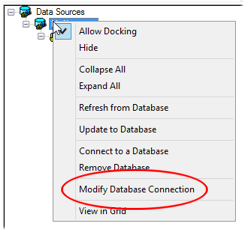 With one exception, changing a DataSource utilizes the same steps as creating a DataSource. Instead of right clicking on DataSources and selecting New Database DataSource, you need to right click on the DataSource you want to change and select Modify Database Connection from the menu.
From this point you follow the steps for creating a DataSource. All previously created queries will then reference the new DataSource.
Can we improve this topic? Click Send Feedback in the upper right of the screen to share your comments!