CM4D Upload Portal Services
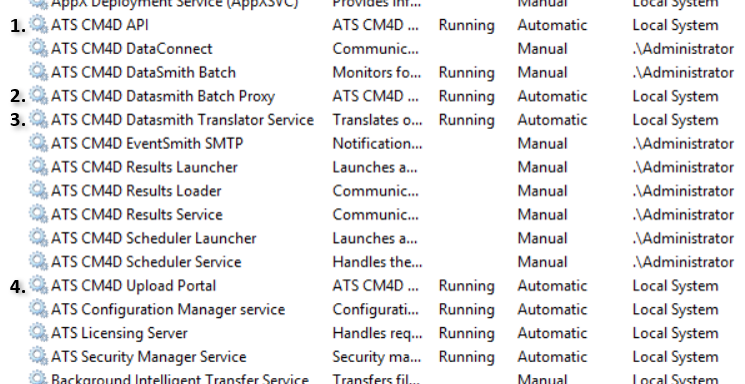
The CM4D Upload Portal utilizes four Windows services:
- ATS CM4D API
- ATS CM4D DataSmith Batch Proxy
- ATS CM4D DataSmith Translator
- ATS CM4D Upload Portal
These services do not have any special user log on requirements. All of these services depend on a connection to the ATS Security and Configuration Manager, whether local or remote.
CM4D API
The CM4D API service connects the CM4D Configuration plugin to its supported applications via ATS Security and Configuration Manager. This must be running on the same machine as the CM4D Upload Portal service and have a connection to the ATS Security and Configuration Manager.
Dependencies: CM4D Upload Portal service
Requirements:
- ATS Security and Configuration Manager/CM4D Configuration
- CM4D Upload Portal Application
CM4D Upload Portal
The CM4D Upload Portal service runs the Upload Portal web application.
Dependencies: CM4D API service
Requirements:
- ATS Security and Configuration Manager/CM4D Configuration
- CM4D Upload Portal Application
DataSmith Batch Proxy
The DataSmith Batch Proxy service connects the DataSmith Batch service to CM4D applications via the CM4D Configuration. Each instance of the DataSmith Batch service must have DataSmith Batch proxy service installed on the same machine.
Dependencies: DataSmith Batch Service
Requirements:
- ATS Security and Configuration Manager/CM4D Configuration
- DataSmith Batch Proxy endpoint
DataSmith Translator
The DataSmith Translator service opens the DataSmith translator assigned to a DataSmith Batch job that validates and previews the data file before it is uploaded for processing.
Dependencies: none
Requirements:
- ATS Security and Configuration Manager/CM4D Configuration
- DataSmith.NET Translator endpoint