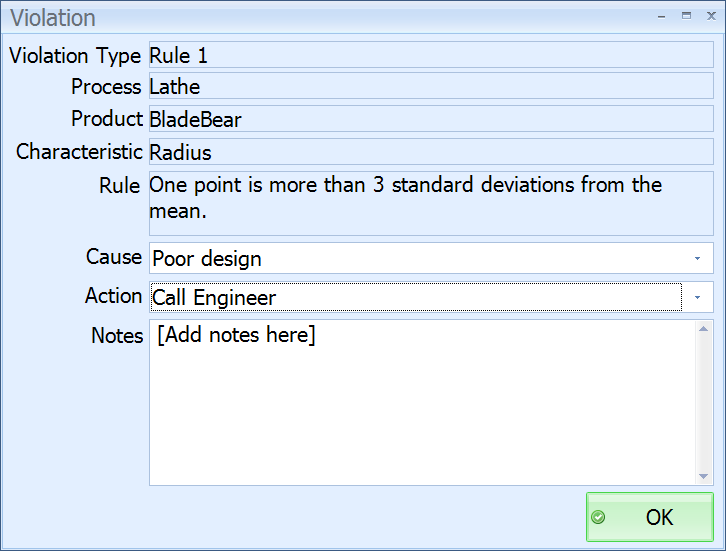
The Violation screen appears when the operator saves a subgroup that contains values that have caused one of the characteristics to violate the Nelson Rules.
The operator can select a cause and action for the violation, as well as adding notes.
| Control | Used to perform this action |
 Violation Type Label Violation Type Label |
Violation Type label. |
 Violation Type Value Violation Type Value |
Displays the violation type. |
| Cause Label |
Cause label. |
 Cause List Cause List |
Click to select a cause from a list. |
| Action Label |
Action label |
| Action List |
Click to select an action from a list. |
| Rule Label |
Rule label. |
| Rule Value |
Displays the rule that has been violated. |
| Process Label |
Process label. |
| Process Value |
Displays the process in which the violation took place. |
| Characteristic Label |
Characteristic label. |
| Characteristic Value |
Displays the characteristic on which the violation took place. |
| Product Label |
Product label |
| Product Value |
Displays the product on which the violation took place. |
| Notes Label |
Notes label |
 Notepad Notepad |
Click here to enter notes relating to the violation. |
 OK Button OK Button |
Click to save the violation details. |
 Cancel Button Cancel Button |
Click to stop entering the violation details. |