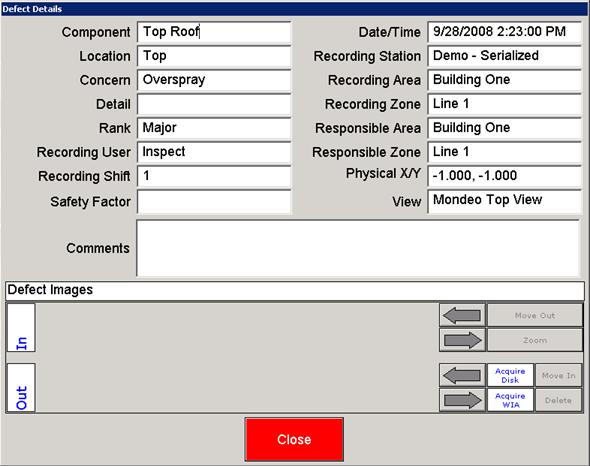
The Defect Details screen is available from the Overview screen. It contains additional information to that displayed in the Overview window, including recording area/cell, repair area/cell, responsible area/cell and image view.
If you are using Inspect's Image Acquisition features, the Details screen also contains the Image Management controls.
The following is an example of a Defect Details screen.
The Defect - Details screen utilizes the following controls:
| Control | Used to perform this action |
 Close Close |
Click to close the Defect - Details screen. |
 Assembly Area Assembly Area |
Identifies the assembly area for the defect. |
| Assembly Cell |
Identifies the assembly cell for the defect. |
| Comments |
Identifies the comments for the defect. |
| Component |
Identifies the component for the defect. |
| Concern |
Identifies the concern assigned to this defect. |
| Detail |
Identifies any detail information associated to this defect. |
| Location |
Identifies the location of the defect. |
| Part |
Identifies the selected part. |
| Physical X/Y Coordinate |
Identifies the physical grid coordinates of the defect. |
| Rank |
Identifies the severity rank of the defect. |
| Recording Area |
Identifies the recording area. |
| Recording Cell |
Identifies the recording cell. |
| Recording Crew |
Identifies the crew used when the defect was recorded. |
| Recording Date/Time |
Identifies the date/time the defect was recorded. |
| Recording Shift |
Identifies the shift when the defect was recorded. |
| Recording Station |
Identifies the station where the defect was recorded. |
| Recording User |
Identifies the logged in user who entered the defect. |
| Responsible Area |
Identifies the area that is responsible for the assigned concern. |
| Responsible Cell |
Identifies the cell that is responsible for the assigned concern. |
| Safety Factor |
Identifies the safety factor of the selected defect. |
| View |
Identifies the view in which the defect is identified. |
 Image Auto-Control Image Auto-Control |
Click to add images to the current inspection record. |