General
Added caching to Event Service to improve performance and reduce I/O load
The service config file now contains the following entry:
<setting name="EnableCache" serializeAs="String">
<value>True</value>
Added caching to CAD Report Service to increase throughput
Added caching to CAD Report Service. Also, added a new IMgmtService contract to expose a "ClearCache" method along with an "EnableCache" setting to the app.config.
Cockpit
Defect Details can be hidden for specific stations
Detail folders can be assigned to particular stations to limit the list of details shown for each station. This feature operates in the same fashion as assigning Concern folders to stations.
Focused control on unit switch
Ability added to choose the default action after switching unit. The options are None, Defect, Overview and Checklist.
Ability to set Defect Status Filter at Data Collect start up
A Default defect status filter option has been added to the Defect/Repair Options in Station Properties. The filter can be set to All, Not Repaired, Partially Repaired, Repaired and Confirmed.
Added new checklist validation type that uses unit_lookup_codes table
Added very flexible validation using the combination of Lookup Type + [current_answer_value] to search the ULC table for a matching record.
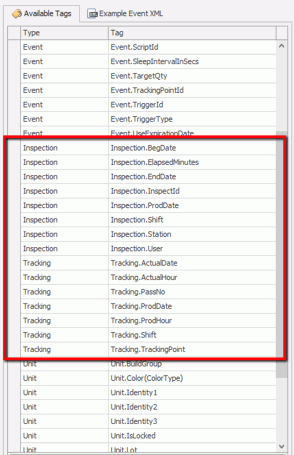
Added additional tags to the Inspect - Completed Event.
Added ability to have multiple correct validation matches for a single answer in checklist
There are instances where there is a requirement to have multiple lookup values associated to one answer. The use case for this is as following:
Item A is going to be shipped to England. The company has 4 different lookup codes for English lettering on the item.
-
101 = English US
-
102 = English UK
-
103 = English Australia
-
104 = English Ireland
Item A has 104 in the unit_lookup_codes table. The checklist question will be configured with the following prompt and display values:
What language lettering is on the item?
-
English
-
Spanish
-
French
-
Arabic
With multiple valid codes associated to English, it wouldn’t matter which English code is assigned to Item A. The only requirement is that it is English, therefore the lookup values of 101, 102, 103 or 104 are valid.
Limit list of available responsible areas and cells in Data Collect
This feature limits the list of available responsible areas and cells in Data Collect per station.
This functionality ensures that only areas and cells that are earlier in the process show up in Data Collect when entering a defect or repair.
Search Criteria for Unit Correction updated
A unit tab has been added to Unit Correction to assist users in identifying specific units.
Travel tickets updated to accommodate longer codes
The ticket type has been reworked so that longer color codes properly fit on label.
Cache tab removed from Travel Service
Inspect no longer caches individual items and therefore the Cache tab has been removed from the Travel service. The clear cache button is now located at the bottom of the window.
Services automatically registered
Services that previously required registration via Cockpit are now automatically registered.
Add filter and find capability in Bulk Translation
Added find/filter option to Bulk Translation form.
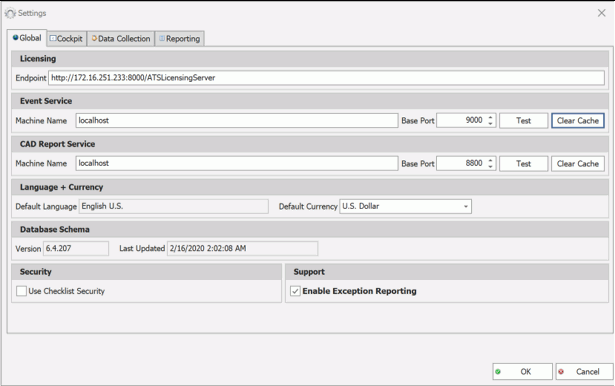
Added "clear cache" for Event Service and CAD Report Service to Settings form in Cockpit
Defect checklist questions tags in defect event now included for output to ATS Bus
Defect checklist questions are now included in the defect event to ATS Bus from the event service.
Delete Audits capability added
Audits can now be published, unpublished or removed.
View Composer
Store optional 'defect_tolerance' for views to tweak defect visibility detection
A hardcoded value of 1 is used for the tolerance by default, however if an image has an abnormally scaled model, there is now an option to override this tolerance on a view level.
views_vector
defect_tolerance (float, nullable) (no range)
Form Composer
Updated Defect Control with property to change prompt for Track Number.

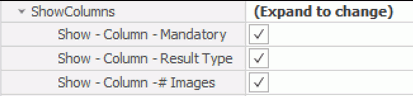
Images Column can be hidden in Checklist Control
Added "ShowNumImagesColumn" property to the Checklist Control that allows the # Images column to be hidden.
Background colour of Login Status can be customised
The login status button can be customised with a user defined background colour. The properties 'Button' and 'Label' in the LoginToggleButton control have been updated to include 'BackColor' . Some additional code is required in the 'Code-Behind' of the Main form. For further details, please click here.
Added ability to hide the defect mark area mode button on Defect Control
Customers now have the ability to hide the defect marked area selection button on the Defect Entry screen. A property to the Defect Control has been added for this purpose.
UnitLookupCodeGrid updated to allow change of column width
Added ability to interactively set column widths.
Added visual indicator for unit checklist questions with comments
Increased Lot # field size to 50 Characters
The Lot # field for the custom create new unit form has been updated to contain a maximum of 50 characters.
Data Collect
Default to prior direct run destination if unit seen at station where routing has already occurred
In previous versions, when a unit was loaded and the direct run destination was selected, it would be reset to the default when the unit was reloaded.
The standard behaviour has been updated so that the default selection is the previous destination through which that unit had passed.
Reporting
Product code and Defect Status updated in Open Defects at Tracking point Report (201)
The Product Code is now included in the Open Defects at Tracking Point Report (201)
report along with the Defect Status.
Images added to checklist questions now visible in reporting
Added parameter for Chart to show Defects and/or Bad Units in Detail (214) report.
Larger charts are displays when selecting 'Chart Only' option in Detail (214) report.
Added Build Group as parameter in Open Defects (103)
New Concern Ranking - Andon (144) report added.
Concern Ranking report formatted for widescreen andon displays.
Inspection Data Dump (136) report updated to include users First and Last name.
The Inspection Data Dump (136) report has been updated with an additional column that displays the First and Last name of the operator.
P-Chart (260) and U-Chart (261) updated to include various intervals
The P-Chart (260 and U-Chart have been updated to include an Interval parameter. The interval can be set to Day, Week, Month and quarter, which will allow users to analyse data over a wider range of periods.
Inspections by User (132) updated with Product column
The Inspections by User (132) report has been updated to include a Product column in the Inspections drilldown.
Tracking Point Summary (601) updated with Tracking Pass number
The Tracking Point Summary (601) report has been updated to include a Pass column in the hours and totals drilldowns.
Monthly Daily Chart (202) updated to allow decimals and include FY for Current Year.
The Monthly Daily Chart (202) has been updated to allow decimals in the target parameter. In addition, the chart now includes FY for the current year.
Added multiple product and shift selection to Concern Trend (207) report
The Concen Trend (207) report has been updated to enable multiple product and shifts selections.
Added report for Part Ranking
The Part Ranking (147) report can be found under the Defects menu of ARS.