In this Topic Hide
An OT Bus Stop allows data to be exchanged with equipment on the factory floor via an intermediary such as an OPC or XML server. The OT bus stop will listen out for messages on the Bus that correspond to the message type, operations and equipment that it's set up for. When it sees an appropriate message it passes the relevant information down to the equipment.
To create a bus stop that will communicate with equipment on the shop floor you need to carry out the following steps:
3. Create Message Channels
The OT Bus Stop will send data to the Bus automatically when it receives a message from the Bus or from the factory floor. For example, if the bus stop receives a message from the Bus that a particular operation needs to be started it might send a message back to the Bus stating that the operation start request should be recorded in the archive. Alternatively, if the bus stop receives a message from equipment that a particular operation has ended it may send separate messages to the Bus that say the operation has ended and how much was produced in the operation.
The contents of the messages that the OT Bus Stop uploads to the Bus are pre-defined and cannot be altered.
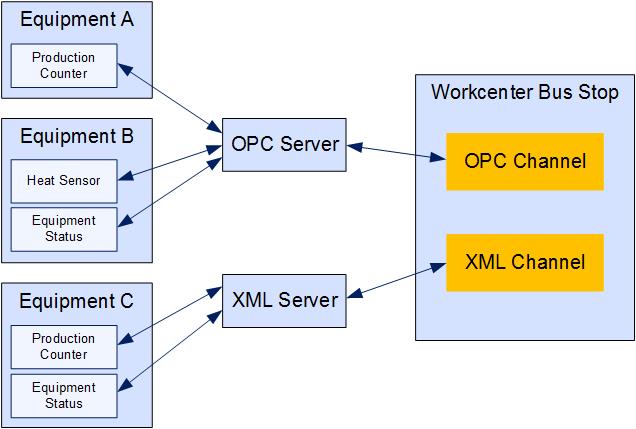
Generally the Bus Stop will not connect directly with the equipment. Instead it will link to an intermediary such as an OPC server which is connected to one or more pieces of equipment and sensors.
The connection is made using Channels.
Each OT Bus Stop has one or more channels and each channel is connected
to a server which, in turn, is connected to one or more pieces of equipment.