ATS Bus supports the following authentication types:
None – no authentication is required.
HTTP Basic Auth – HTTP Basic Authentication type. Very often used for domain or workgroup server accounts.
OAuth – Open Authentication is a token-based authentication type
OAuth2 – Open Authentication 2 is a token-based authentication type with token expiration period.
JWT with X.509 - Designed specifically to interact with SIMATIC IT UAF.
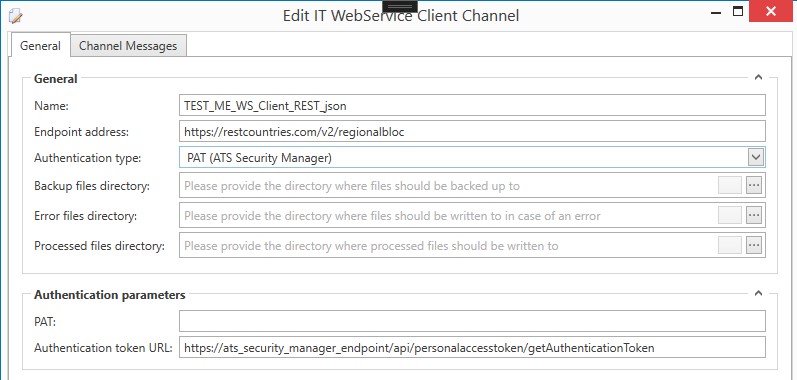
PAT (ATS Security Manager) - Authenticate with ATS Security Manager.
HTTP Basic Auth
HTTP Basic authentication is the simplest technique for enforcing access controls to web resources because it does not require cookies, session identifiers, or login pages. Instead it uses standard fields in the HTTP header, removing the need for handshakes.
Just specify a user name and password in the authentication parameters dialog section.
OAuth
OAuth 1.0 is an open standard for access delegation, commonly used as a way for Internet users to grant websites or applications access to their information on other websites but without giving them the passwords.
Generally, OAuth provides to clients a "secure delegated access" to server resources on behalf of a resource owner. It specifies a process for resource owners to authorize third-party access to their server resources without sharing their credentials. Designed specifically to work with Hypertext Transfer Protocol (HTTP), OAuth essentially allows access tokens to be issued to third-party clients by an authorization server, with the approval of the resource owner. The third party then uses the access token to access the protected resources hosted by the resource server.
OAuth2
OAuth 2 is not backwards compatible with OAuth 1. OAuth 2 provides specific authorization flows for web applications, desktop applications, mobile phones, and smart devices.
OAuth 2 is an authorization framework that enables applications to obtain limited access to user accounts on an HTTP service, such as Facebook, GitHub, and Google. It works by delegating user authentication to the service that hosts the user account and authorizing third-party applications to access the user account. OAuth 2 provides authorization flows for web and desktop applications, and mobile devices.
OAuth 2 requires grant type specification:
For Password type username and password is required
For Client Credentials client id and client secret is required
For Device Code device code is required
Application ID is optional. Important is Access Token URL which means the path to the web API method where the channel can get an access token.
JWT with X.509
This type of authentication was designed specifically to interact with SIMATIC IT UAF. The Access Token is the token required to invoke any SIMATIC IT UAF exposed service over the web. The token is built on the JSON Web Token (JWT) industry standard and contains all the claims belonging to the certificate that has originated it. User must export the X.509 certificate from the computer certificate storage to .pfx file and convert it to the base64 encoded string. Base64 representation of the certificate can be passed into the form.
The certificate must contain a private key.
PAT (ATS Security Manager)
A personal access token is a common technology used to authorise a service to act on behalf of a user. Access tokens with a specified lifetime can be created by users and revoked if necessary.
PAT is an alternative to OAuth2 to authenticate and authorize using basic authentication. Gitlab for example uses a PAT: Personal access tokens | GitLab.
Configuration options:
The PAT that you obtain from the ATS Security Manager/Configuration manager as a password field.
The ATS Security Manager has an API at the following address http://xxxxxxxxxxxxxxx/api/personalaccesstoken/getAuthenticationToken, which takes the PAT and returns an access token. This property is by default predefined as https://ats_security_manager_endpoint/api/personalaccesstoken/getAuthenticationToken. The base address marked as ats_security_manager_endpoint must be replaced.