Why are some descriptions shown as an asterisk (star)?
Your user account is linked to a language. This means that when you log into ATS Bus Cockpit all of the descriptions will be shown in your language. However, if a description has not been entered in your language then it will be shown as an asterisk.
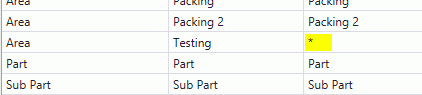
You can edit the item to enter the description in your language. For further information see here.
What is the logout button doing in Cockpit, bus stop monitor and work order manager?
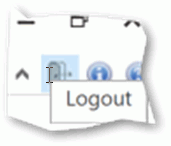
The logout button in the upper right corner of Cockpit, bus stop monitor and the work order manager (as shown below) logs out the current user and shows the ATS Security Manager login screen to logon as a different user.
How ATS Bus converts JSON to XML and XML to JSON
JSON contains 2 fundamental types, objects and arrays (see: https://json.net):
Objects: a collection of name-value pairs (also known as properties) contained in braces ( {} ). The name and values are separated by a colon ( : ) and the name-value pairs are separated by commas ( , ) . The names in an object are always a string. The values in a name-value pair may be one of the following types:
string
number
object
array
true
false
null
Arrays: A collection of values enclosed by brackets ( [] ). Each value in the array may be of a different type.
Converting XML to JSON
ATS Bus uses the SerializeXNode and SerializeXmlNode methods from the JsonConvert class in the Newtonsoft JSON library (https://www.newtonsoft.com/json) as shown in the example below. Channel messages may expose the option to omit the XML root element from the XML document when converting it to JSON. Please note that ATS Bus translates the XML root node which excludes the XML declaration from the transformation.
Converting JSON to XML
ATS Bus performs the following checks on the incoming JSON:
ATS Bus checks if the received data is an array and converts it to an object containing a single property named ‘array’ and sets the property value to the original array. This is required because the converter cannot convert an JSON array to valid XML.
Example:
Original JSON array: [ “value1”, “value2”, “value3” ]
Modified JSON object with a single property named ‘array’: { “array” : [ “value1”, “value2”, “value3” ] }
ATS Bus wraps the result in an XML root element when the number of properties in the object is greater than one or when the property value is an array with multiple values. This is required because XML cannot contain multiple root elements.
Example 1:
JSON input: [ “value1” ]
Intermediate JSON: { “array” : [ “value1” ] }
XML output: <array>value1</array>
Example 2:
Input: Input: { “key1” : “value1” }
Output: <key1>value1</key1>
Example 3:
Input: { "node1": {"array": ["AA","BB"],"key1": "123"} }
Output: <node1><array>AA</array><array>BB</array><key1>123</key1></node1>
Example 4:
Input: [ “value1”, “value2” ]
Intermediate output: { “array” : [ “value1”, “value2” ] }
Output: <root><array>value1</array><array>value2</array></root>
Example 5:
Input: Input: { “key1” : “value1”, “key2” : “value2” }
Output: <root><key1>value1</key1><key2>value2</key2></root>
A few ATS Bus channels may have a checkbox named wrap XML in root element. When ticked, the channel message will always wrap the result in an XML root element. When not ticked, the channel message will only wrap the result in an XML root element when the number of properties in the object is greater than one or when the property value is an array with multiple values.
C# example converting JSON to XML and XML to JSON
Please be aware that the JSON to XML conversions on freeformatter.com (https://www.freeformatter.com/json-to-xml-converter.html) differ from the conversions done by the Newtonsoft library in ATS Bus. The C# code example below shows how ATS Bus converts JSON to XML and XML to JSON using the Newtonsoft library. (The code does not work in .NETFiddle because of ‘Newtonsoft.Json.Linq’ library)
using System;
using System.Linq;
using System.Xml.Linq;
using Newtonsoft.Json;
using Newtonsoft.Json.Linq;
namespace ConsoleApp10
{
class Program
{
static void Main()
{
const int maxExamples = 12;
var examples = new string[maxExamples];
examples[0] = "{\"a\":\"b\"}";
examples[1] = "{\"A\":\"a\",\"B\":\"b\"}";
examples[2] = "[\"a\"]";
examples[3] = "[\"a\",\"b\"]";
examples[4] = "[{\"A\":\"a\"}]";
examples[5] = "[{\"A\":\"a\",\"B\":\"b\"}]";
examples[6] = "[{\"A\":\"a\",\"B\":\"b\"},{\"A\":\"a\",\"B\":\"b\"}]";
examples[7] = "{\"U\":[{\"A\":\"a\"}]}";
examples[8] = "{\"U\":[{\"A\":\"a\",\"B\":\"b\"}]}";
examples[9] = "{\"U\":[{\"A\":\"a\",\"B\":\"b\"},{\"A\":\"a\",\"B\":\"b\"}]}";
examples[10] = "{\"U\":[{\"V\":{\"A\":\"a\",\"B\":\"b\"},\"W\":{\"C\":\"c\"}},{\"V\":{\"A\":\"a\",\"B\":\"b\"},\"W\":{\"C\":\"c\"}}]}";
examples[11] = "{\"U\":{\"V\":[{\"A\":\"a\",\"B\":\"b\"},{\"A\":\"a\",\"B\":\"b\"}]}}";
for (int cnt=0; cnt < maxExamples; cnt++)
{
Console.WriteLine($"* Example {cnt+1}:");
var xml = JsonToXDocument(examples[cnt], false);
var json = XDocumentToJson(xml, false);
Console.WriteLine("");
}
}
private static XDocument JsonToXDocument(string json, bool wrapInRootElement)
{
Console.WriteLine("JSON to XML conversion, original JSON:\n" + FormatJson(json));
var jObject = ParseJsonString(json);
if (!jObject.Any())
{
return null;
}
json = jObject.ToString(Newtonsoft.Json.Formatting.None);
XDocument result;
if (wrapInRootElement)
{
result = JsonConvert.DeserializeXNode(json, "root");
}
else
{
// A JObject is a JContainer holding a collection of JProperties
var firstProperty = (JProperty)jObject.First;
var firstPropertyValueType = firstProperty.Value.Type;
var firstPropertyValueCount = firstProperty.Value.Count();
// wrap the result in an XML root element when object holds
// more than one property or when the property value is an
// array holding more than 1 item.
if (jObject.Count() > 1 || firstPropertyValueType == JTokenType.Array && firstPropertyValueCount > 1)
{
logger?.WriteWarning("Incoming JSON creates multiple root nodes, adding a root node named 'root'");
result = JsonConvert.DeserializeXNode(json, "root");
}
else
{
result = JsonConvert.DeserializeXNode(json);
}
}
Console.WriteLine("JSON to XML conversion, XML:\n" + result);
return result;
}
private static string XDocumentToJson(XDocument xml, bool omitRootObject = true)
{
// Console.WriteLine(“XML to JSON conversion, XML:\n” + xml);
// Use XDocument.Root to omit the XML declaration in the JSON output
var result = JsonConvert.SerializeXNode(xml.Root, Formatting.Indented, omitRootObject);
Console.WriteLine("XML to JSON conversion, JSON:\n" + result);
return result;
}
private static JToken ParseJsonString(string jsonString)
{
var jToken = JToken.Parse(jsonString);
if (!jToken.Any())
{
return jToken;
}
// Test if the root node is an array and wrap it in
// a JObject containing a property named 'array'.
if (jToken is JArray)
{
jToken = new JObject(new JProperty("array", jToken));
}
return jToken;
}
private static string FormatJson(string unformatted)
{
var obj = JsonConvert.DeserializeObject(unformatted);
return JsonConvert.SerializeObject(obj, Formatting.Indented);
}
}
}
The code example above outputs:
Example 1:
JSON to XML conversion, original JSON:
{
"a": "b"
}
JSON to XML conversion, XML:
<a>b</a>
XML to JSON conversion, JSON:
{
"a": "b"
}
Example 2:
JSON to XML conversion, original JSON:
{
"A": "a",
"B": "b"
}
Incoming JSON has no root node, adding root node named 'root'
JSON to XML conversion, XML:
<root>
<A>a</A>
<B>b</B>
</root>
XML to JSON conversion, JSON:
{
"root": {
"A": "a",
"B": "b"
}
}
Example 3:
JSON to XML conversion, original JSON:
[
"a"
]
JSON to XML conversion, modified JSON:
{
"array": [
"a"
]
}
JSON to XML conversion, XML:
<array>a</array>
XML to JSON conversion, JSON:
{
"array": "a"
}
Example 4:
JSON to XML conversion, original JSON:
[
"a",
"b"
]
JSON to XML conversion, modified JSON:
{
"array": [
"a",
"b"
]
}
Incoming JSON has no root node, adding root node named 'root'
JSON to XML conversion, XML:
<root>
<array>a</array>
<array>b</array>
</root>
XML to JSON conversion, JSON:
{
"root": {
"array": [
"a",
"b"
]
}
}
Example 5:
JSON to XML conversion, original JSON:
[
{
"A": "a"
}
]
JSON to XML conversion, modified JSON:
{
"array": [
{
"A": "a"
}
]
}
JSON to XML conversion, XML:
<array>
<A>a</A>
</array>
XML to JSON conversion, JSON:
{
"array": {
"A": "a"
}
}
Example 6:
JSON to XML conversion, original JSON:
[
{
"A": "a",
"B": "b"
}
]
JSON to XML conversion, modified JSON:
{
"array": [
{
"A": "a",
"B": "b"
}
]
}
JSON to XML conversion, XML:
<array>
<A>a</A>
<B>b</B>
</array>
XML to JSON conversion, JSON:
{
"array": {
"A": "a",
"B": "b"
}
}
Example 7:
JSON to XML conversion, original JSON:
[
{
"A": "a",
"B": "b"
},
{
"A": "a",
"B": "b"
}
]
JSON to XML conversion, modified JSON:
{
"array": [
{
"A": "a",
"B": "b"
},
{
"A": "a",
"B": "b"
}
]
}
Incoming JSON has no root node, adding root node named 'root'
JSON to XML conversion, XML:
<root>
<array>
<A>a</A>
<B>b</B>
</array>
<array>
<A>a</A>
<B>b</B>
</array>
</root>
XML to JSON conversion, JSON:
{
"root": {
"array": [
{
"A": "a",
"B": "b"
},
{
"A": "a",
"B": "b"
}
]
}
}
Example 8:
JSON to XML conversion, original JSON:
{
"U": [
{
"A": "a"
}
]
}
JSON to XML conversion, XML:
<U>
<A>a</A>
</U>
XML to JSON conversion, JSON:
{
"U": {
"A": "a"
}
}
Example 9:
JSON to XML conversion, original JSON:
{
"U": [
{
"A": "a",
"B": "b"
}
]
}
JSON to XML conversion, XML:
<U>
<A>a</A>
<B>b</B>
</U>
XML to JSON conversion, JSON:
{
"U": {
"A": "a",
"B": "b"
}
}
Example 10:
JSON to XML conversion, original JSON:
{
"U": [
{
"A": "a",
"B": "b"
},
{
"A": "a",
"B": "b"
}
]
}
Incoming JSON has no root node, adding root node named 'root'
JSON to XML conversion, XML:
<root>
<U>
<A>a</A>
<B>b</B>
</U>
<U>
<A>a</A>
<B>b</B>
</U>
</root>
XML to JSON conversion, JSON:
{
"root": {
"U": [
{
"A": "a",
"B": "b"
},
{
"A": "a",
"B": "b"
}
]
}
}
Example 11:
JSON to XML conversion, original JSON:
{
"U": [
{
"V": {
"A": "a",
"B": "b"
},
"W": {
"C": "c"
}
},
{
"V": {
"A": "a",
"B": "b"
},
"W": {
"C": "c"
}
}
]
}
Incoming JSON has no root node, adding root node named 'root'
JSON to XML conversion, XML:
<root>
<U>
<V>
<A>a</A>
<B>b</B>
</V>
<W>
<C>c</C>
</W>
</U>
<U>
<V>
<A>a</A>
<B>b</B>
</V>
<W>
<C>c</C>
</W>
</U>
</root>
XML to JSON conversion, JSON:
{
"root": {
"U": [
{
"V": {
"A": "a",
"B": "b"
},
"W": {
"C": "c"
}
},
{
"V": {
"A": "a",
"B": "b"
},
"W": {
"C": "c"
}
}
]
}
}
Example 12:
JSON to XML conversion, original JSON:
{
"U": {
"V": [
{
"A": "a",
"B": "b"
},
{
"A": "a",
"B": "b"
}
]
}
}
JSON to XML conversion, XML:
<U>
<V>
<A>a</A>
<B>b</B>
</V>
<V>
<A>a</A>
<B>b</B>
</V>
</U>
XML to JSON conversion, JSON:
{
"U": {
"V": [
{
"A": "a",
"B": "b"
},
{
"A": "a",
"B": "b"
}
]
}
}
How to export the failed messages from ServiceInsight
It might happen that ATS Bus is unable to deliver messages to a certain channel or endpoint because of an error. These messages are sent to the ServiceControl error queue and will appear as error messages in ServiceInsight. You can retry those messages if the configuration issue is resolved or you can export these messages to an excel file if retrying the messages is not an option.
Error messages are sent to the ServiceControl error queue and ServiceControl stores these messages in an embedded RavenDB database.
For further information on monitoring bus stops, please click here.
The retention time for these messages is configured (1) in the ServiceControl configuration for this specific ServiceControl instance:
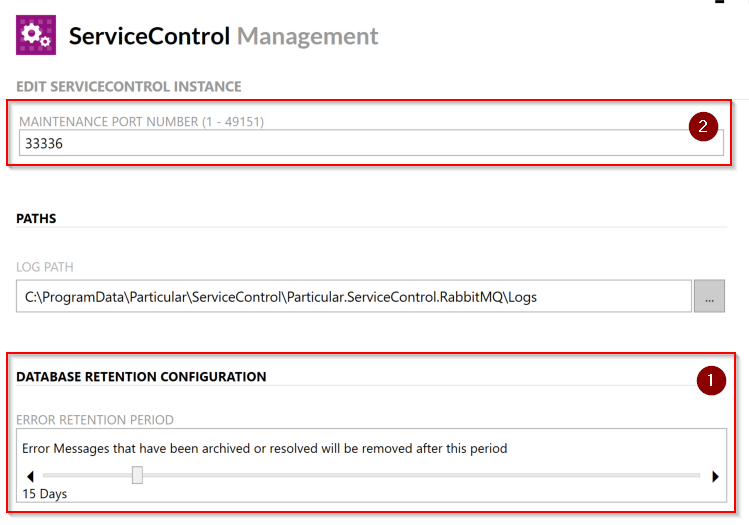
Error messages are exported using the Export to Excel functionality in RavenDB Studio, which is only accessible when the ServiceControl instance runs in maintenance mode. ServiceControl will not consume error and audit messages from the error and audit queues when running in maintenance mode and also ServicePulse and ServiceInsight are unable to connect to ServiceControl.
Follow the steps below to run ServiceControl in maintenance mode and access RavenDB studio, or visit https://docs.particular.net/servicecontrol/maintenance-mode, to obtain the failed messages as CSV export:
Click on the ‘wrench/spanner’.
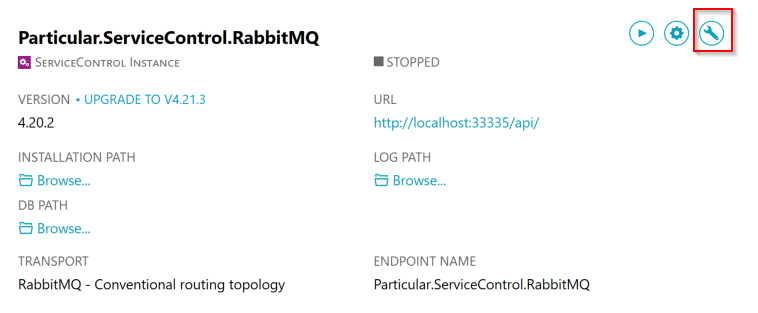
Click Start Maintenance Mode.
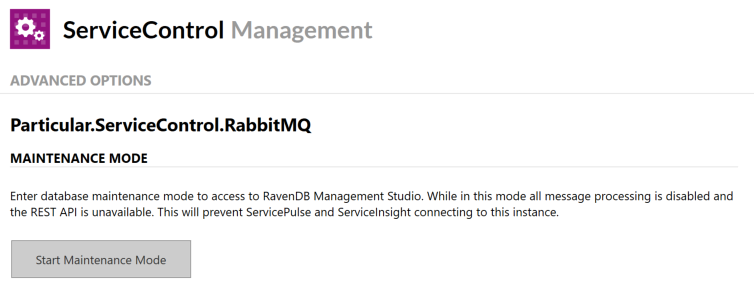
Click on RavenDB Management Studio or right click the text, copy the URL and paste it into a web browser. Ensure to use a recent web browser.
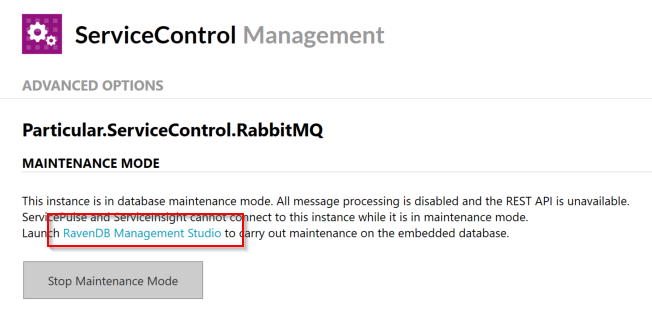
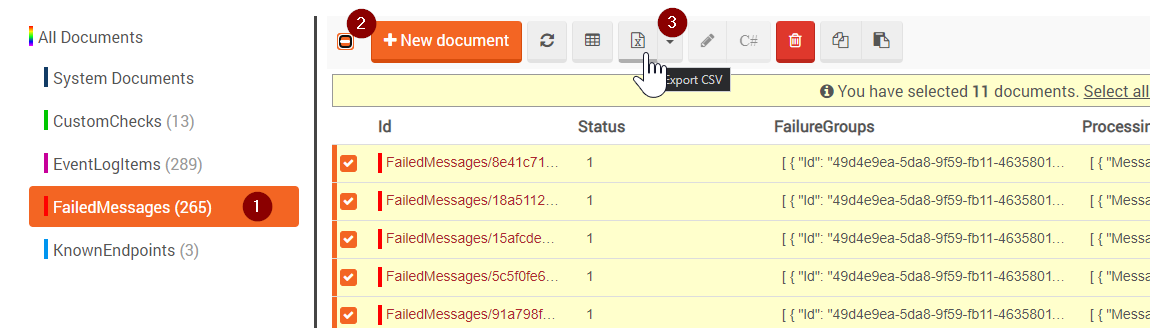
Select FailedMessages from the left hand menu (1), click on the checkbox on the left-hand side of the ‘+ New Document’ (2) button to select all messages and Export to CSV (3).
Once exported, return to the ServiceControl Management dialog and press Stop Maintenance Mode to run ServiceControl in normal mode again.
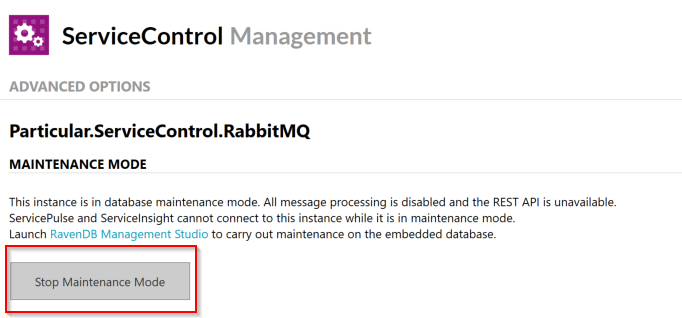
Ensure the Error and Audit Queue are emptied and that ServiceInsight and ServicePulse are able to connect to Service Insight again.
Why are NServiceBus error messages are not deleted after their retention time?
It appears that NServiceBus error messages are not deleted after their retention time. Users still see old messages in ServiceInsight and ServicePulse.
This screenshot shows 2 error messages that are well beyond their retention time:
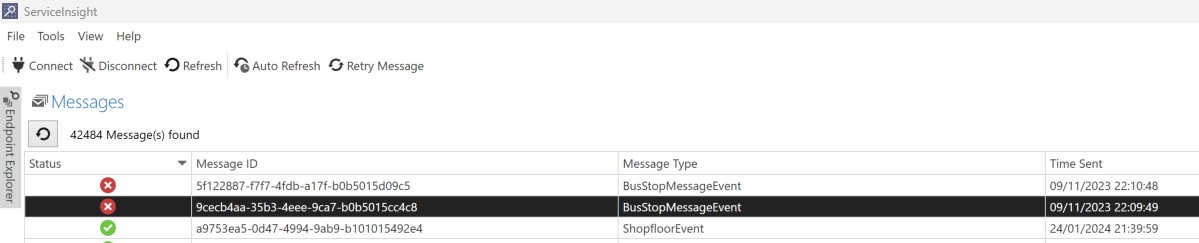
The NServiceBus documentation states that a message is considered for deletion when it's status is set to Archived, RetryIssued or Resolved. This means that the user should at least have retried the message from ServiceInsight or ServicePulse or the user should have tried to delete it in ServicePulse.
The example below shows the 2 failed messages in ServicePulse:
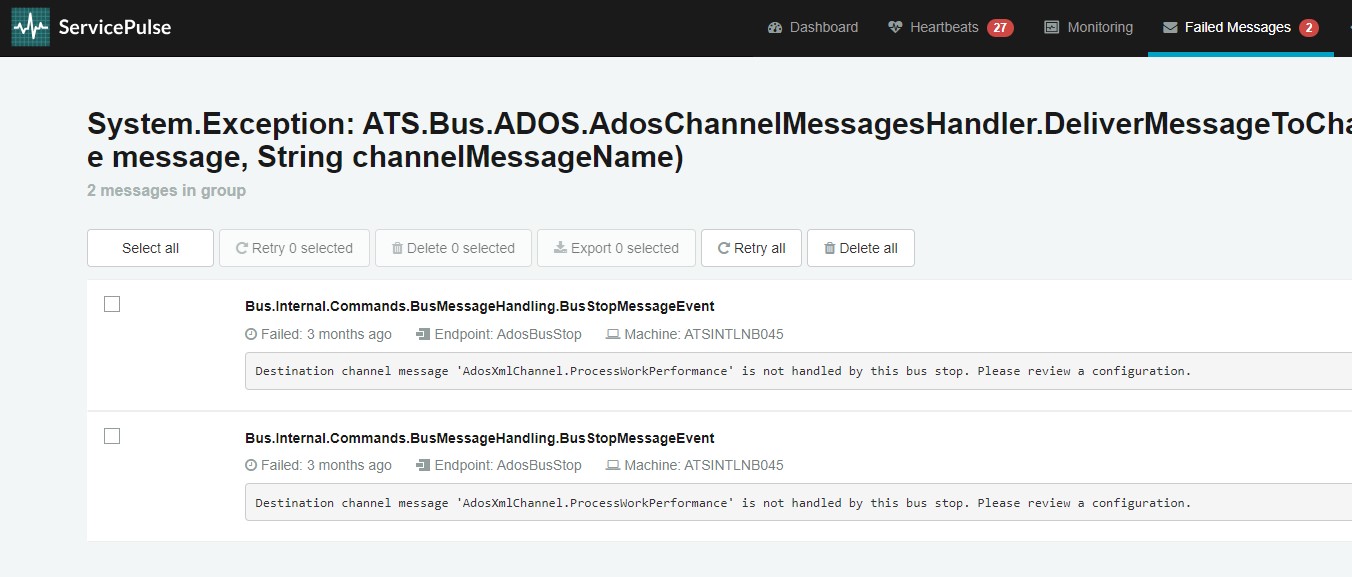
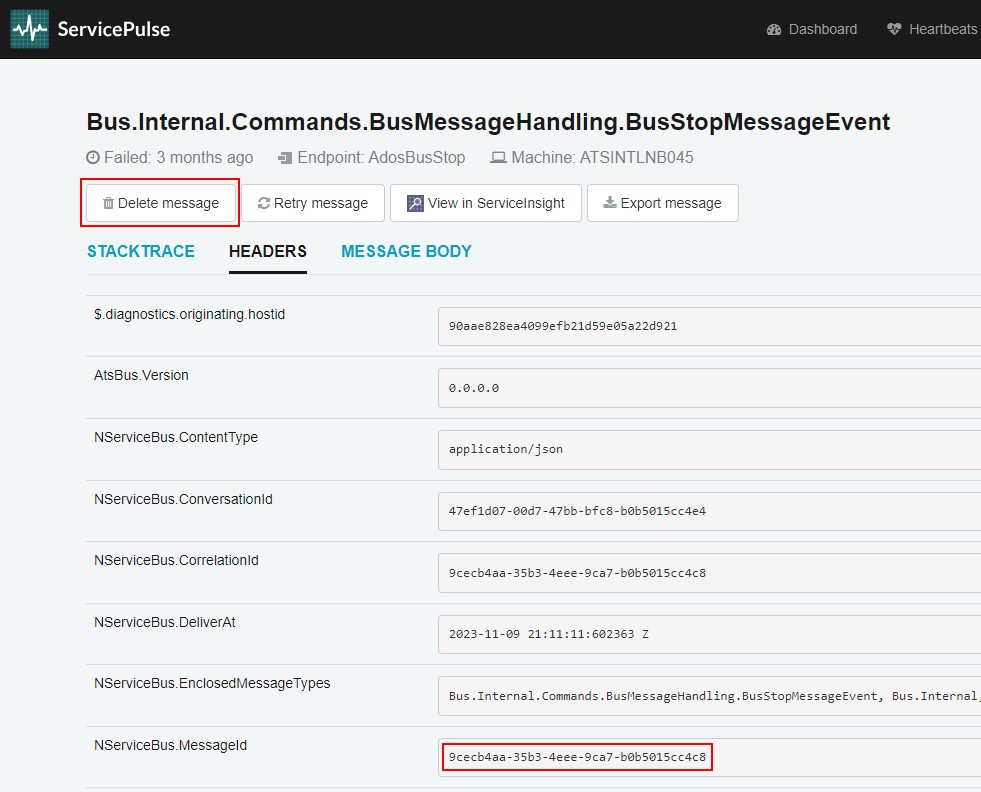
Clicking the delete button will delete the message with message ID '9cecb4aa-35b3-4eee-9ca7-b0b5015cc4c8'.
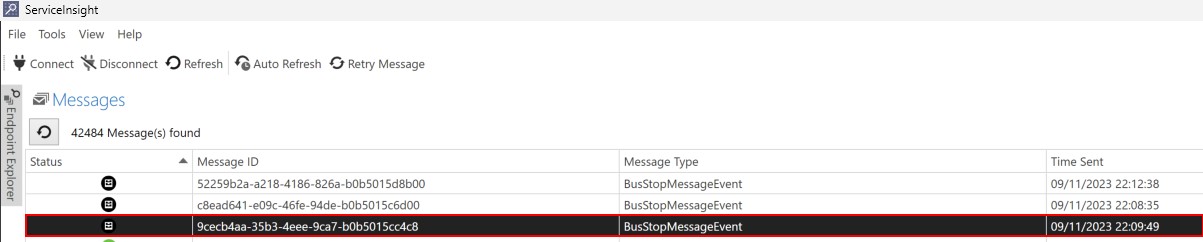
The following message is shown after deletion:

And ServiceInsight also updated the status:
How can I change the way the bus stop logs to file?
The ATS Bus 3.x bus stops use the logging library from Serilog. This library provides lots of properties to change the way the bus stop logs. Serilog is configured in the appsettings file:
"Serilog": {
"MinimumLevel": "Debug",
"AppInsightEnabled": false,
"AppInsightConnectionString": "",
"WriteTo": [
{
"Name": "Console",
"Args": {
"restrictedToMinimumLevel": "Information",
"outputTemplate": "{Timestamp:o} [{Level:u3}] [{ThreadId}] ({Application}) {Message}{NewLine}{Exception}"
}
},
{
"Name": "File",
"Args": {
"restrictedToMinimumLevel": "Information",
"path": "./logs/log_.txt",
"outputTemplate": "{Timestamp:o} [{Level:u3}] [{ThreadId}] ({Application}) {Message}{NewLine}{Exception}",
"rollingInterval": "Day",
"fileSizeLimitBytes": "2097152",
"rollOnFileSizeLimit": true,
"retainedFileCountLimit": 2000
}
}
],
"Enrich": [ "FromLogContext", "WithThreadId" ],
"Properties": {
"Application": "OtBusStop"
},
"EventLogEnabled": true,
"EventLogName": "ATS Bus",
"EventLogSource": "OtBusStop",
"EventLogManageEventSource": true,
"EventLogOutputTemplate": "[{Level:u3}] [{ThreadId}] {Message}{NewLine}{Exception}",
"EventLogRestrictedToMinimumLevel": "Warning"
},
Changing the log severity per namespace allowing one library to log more than others. The example below sets the default logging to 'verbose' but it overrides the severity for the Microsoft and System libraries and sets their verbosity to information. The JSON example below replaces the ' "MinimumLevel": "Debug",' section in the orginal configuration:
"Serilog": {
"MinimumLevel": {
"Default": "Debug",
"Override": {
"Microsoft": "Information",
"System": "Information"
},
The original configuration also shows that verbosity can be changed per logger, event loggers only log errors and warnings while the console and file logs up to information messages.
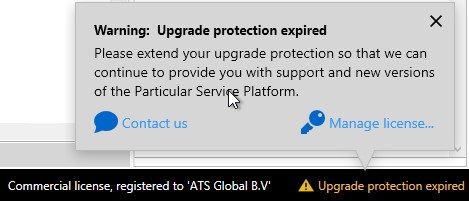
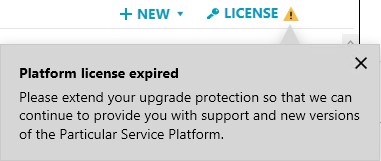
Warning: Upgrade protection expired message in bus stop logging, ServiceInsight, ServiceControl and ServicePulse
ServiceInsight might show the following warning in the lower right corner:
ServiceControl may show the following warning in the upper right corner:
ServicePulse may show the following warning in the license section:
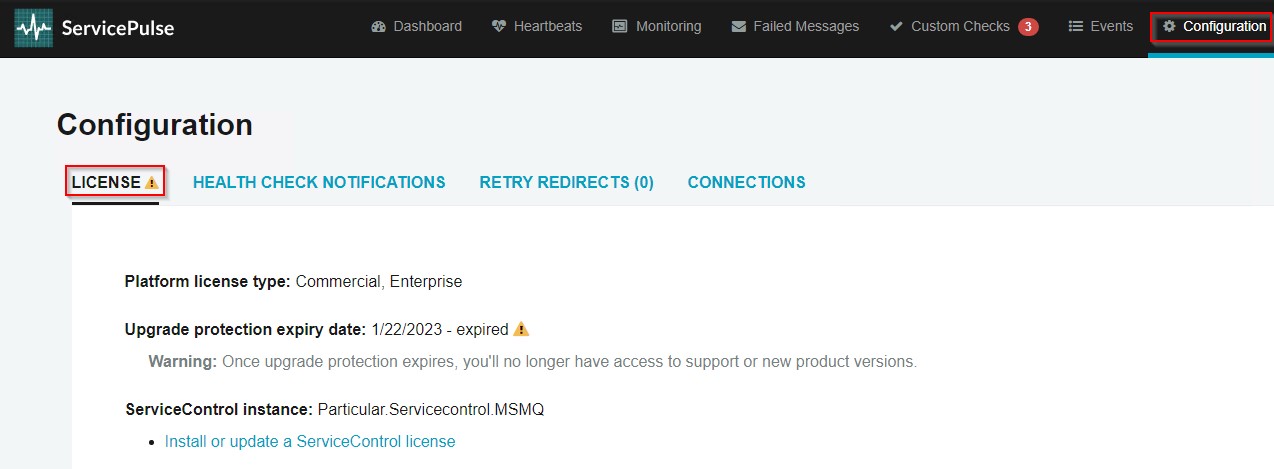
All the warning messages above mean that the tool cannot be upgraded to a newer version without renewing the license. The tool can still be used and is not affected by the warning message. The license is provided via the bus stops and can be upgraded through the ServiceControl Management application by importing the license from the license sub directory in the bus stop installation directory.
Do I need to restart all bus services when their configured certificates are updated?
Yes, you need to restart all services that have the certificates configured in the Kestrel section of the appsettings.json configuration file as the services load the certificates in memory.