The Feature Properties dialog allows you to set the properties of a feature in the Config.
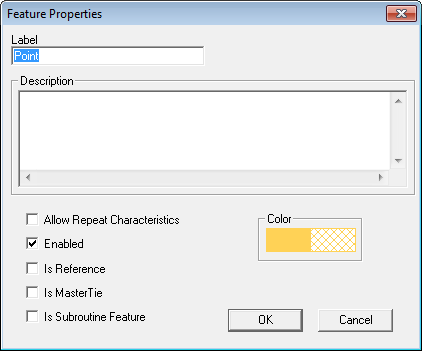
Label
The label of the feature.
Description
A description of the feature (optional).
Color
Double clicking the color will open the Colors dialog, where you can chose the color used to highlight the feature.
Allow Repeat Characteristics
Selecting the Allow Repeat Characteristics check box will make the feature a Repeating Feature.
Enabled
If the Feature is Enabled, it is considered active and will be used in the current scan. Removing the check mark will disable the feature and thus exclude the feature from the current scan.
Is Reference
When Is Reference is selected, the feature will only be used as a reference feature.
Is Master Tie
When a feature is designated as the 'Master Tie', other characteristics can be tied to the feature using the Tie check box and the Tie String settings in the Characteristic Properties dialog.
Is Subroutine Feature
The option Is Subroutine Feature must be selected if the feature is a feature used within a Subroutine.
Can we improve this topic? Click Send Feedback in the upper right of the screen to share your comments!