This topic lists the Windows services each CM4D component or application uses to function.
CM4D Configuration Services
The CM4D Configuration web plugin uses the following Windows services:
- ATS CM4D API - CM4D API is a Windows service which connects to the CM4D Configuration plugin and supports the web applications CM4D Peruse and Upload Portal and their associated Windows services.
- ATS Configuration Manager - Manages the plugin applications used to configure ATS software products within ATS Security and Configuration Manager.
- ATS Licensing Server - Handles the licenses for ATS software applications.
- ATS Security Manager - Provides access to the Configuration Manager and grants user permissions for ATS software products via ATS Security and Configuration Manager.
CM4D Peruse Services
The CM4D Peruse web application uses the following Windows services:
- ATS CM4D API - CM4D API is a Windows service which connects to the CM4D Configuration plugin and supports the web applications CM4D Peruse and Upload Portal and their associated Windows services.
- ATS CM4D Peruse - Runs the CM4D Peruse web application.
- ATS CM4D Peruse API - Works in conjunction with the CM4D Peruse service to run the CM4D Peruse web application.
- ATS Configuration Manager - Manages the plugin applications used to configure ATS software products within ATS Security and Configuration Manager.
- ATS Licensing Server - Handles the licenses for ATS software applications.
- ATS Security Manager - Provides access to the Configuration Manager and grants user permissions for ATS software products via ATS Security and Configuration Manager.
CM4D Server Services
The CM4D Server desktop applications uses the following Windows services:
- ATS CM4D DataConnect - The communication service to ATS data structures. For CM4D, it connects the mail server to CM4D-generated events.
- ATS CM4D DataSmith Batch - Monitors folders and handles data files relating to DataSmith Batch processing. Connects DataSmith Batch to the CM4D database, assigns jobs to users, creates Batch folders and monitors the Batch folders for any activity. The instances of DataSmith that are run via automation to process jobs will inherit permissions from the user running the DataSmith Batch Service.
- ATS CM4D EventSmith SMTP - Variable "service-eventsmithsmtp-description" is not defined
- ATS CM4D Results Loader - Updates the Results database with minimum database locks. This service requires a connection to the CM4D Results database and the Transport/Persistence database(s).
- ATS CM4D Results Sender - Processes the data events from CM4D, extracts the data from the databases and sends the data to Results Loader. In the case of a modified CAD image, a message is sent to the StreamCacheSmith service. This service requires a connection to the CM4D Site database and the Transport/Persistence database(s).
- ATS CM4D Scheduler Launcher - Initializes and manages the CM4D processes used to generate reports for Scheduler jobs. It is used by the Scheduler Service and CM4D Web to run (or "launch") the instances of CM4D that will be used to open documents and print reports.
- ATS CM4D Scheduler - Handles the processing of CM4D Scheduler jobs to generate reports. It connects CM4D Scheduler to the database and assigns jobs to users throughout the system.
- ATS CM4D StreamCacheSmith - The StreamCacheSmith service converts 3D CAD images into the HOOPS streaming format used by web applications such as CM4D Peruse. The stream cache images are stored in the Site database and streamed to clients as-needed for rendering on the client-side HOOPS Viewer. This service requires a connection to the CM4D Results database and the Transport/Persistence database(s) and must be installed on the same machine as the HOOPS Communicator Server.
- ATS Configuration Manager - Manages the plugin applications used to configure ATS software products within ATS Security and Configuration Manager.
- ATS Licensing Server - Handles the licenses for ATS software applications.
- ATS Security Manager - Provides access to the Configuration Manager and grants user permissions for ATS software products via ATS Security and Configuration Manager.
CM4D Upload Portal Services
The CM4D Upload Portal web application uses the following Windows services:
- ATS CM4D API - CM4D API is a Windows service which connects to the CM4D Configuration plugin and supports the web applications CM4D Peruse and Upload Portal and their associated Windows services.
- ATS CM4D DataSmith Batch - Monitors folders and handles data files relating to DataSmith Batch processing. Connects DataSmith Batch to the CM4D database, assigns jobs to users, creates Batch folders and monitors the Batch folders for any activity. The instances of DataSmith that are run via automation to process jobs will inherit permissions from the user running the DataSmith Batch Service.
- ATS CM4D DataSmith Batch Proxy - Connects the DataSmith Batch service to CM4D applications such as CM4D Upload Portal via the CM4D API service. Each instance of the DataSmith Batch service must have DataSmith Batch proxy service installed on the same machine.
- ATS CM4D DataSmith Translator - Opens the DataSmith translator assigned to a DataSmith Batch job that validates and previews the data file before it is uploaded for processing.
- ATS CM4D Upload Portal - Works in conjunction with the CM4D API, DataSmith Translator and DataSmith Batch Proxy Agent services to run the Upload Portal web application.
- ATS CM4D Upload Portal API - Variable "service-uploadportalapi-description" is not defined
- ATS Configuration Manager - Manages the plugin applications used to configure ATS software products within ATS Security and Configuration Manager.
- ATS Licensing Server - Handles the licenses for ATS software applications.
- ATS Security Manager - Provides access to the Configuration Manager and grants user permissions for ATS software products via ATS Security and Configuration Manager.
Services Deployment Example with Ports
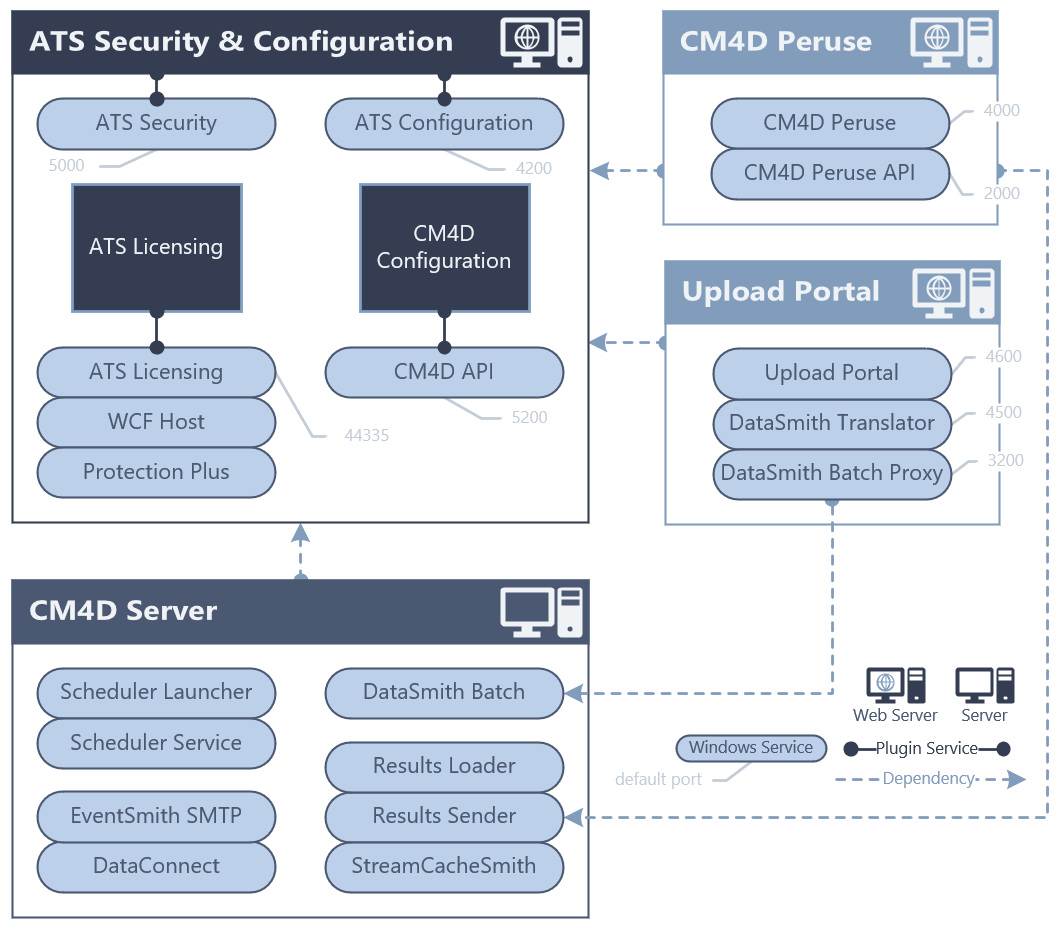
Overview of how the various CM4D and ATS services relate to one another, and their default ports.
Can we improve this topic? Click Send Feedback in the upper right of the screen to share your comments!