Traditional process capability indices such as Ppk assume that process data follows a normal distribution and estimate process spread using the mean and standard deviation. In practice, many manufacturing and business processes produce skewed, bounded, or otherwise non-normal data, making these assumptions unreliable.
The Non-Parametric Ppk method defined in ISO 22514 addresses this challenge by using empirical percentiles rather than a fitted normal distribution. The process spread is determined directly from the observed data using the 0.135th percentile, the median, and the 99.865th percentile. This approach measures actual process performance without requiring assumptions about the underlying distribution.
By evaluating capability directly from observed process percentiles, Non-Parametric Ppk helps quality engineers and process owners make more informed decisions while maintaining consistency with international standards.
By default, most data is evaluated in CM4D using the Normal Distribution method, unless the Non-Parametric Statistics Flag is enabled on the Feature or a variable specifies the calculation method.
Benefits of Non-Parametric Stats
- No normality assumption – Suitable for skewed, multi-modal, or otherwise non-normal process data.
- More realistic capability assessment – Uses the actual observed process distribution rather than an estimated normal distribution.
- Improved robustness – Reduces the risk of overestimating or underestimating capability due to incorrect distribution assumptions.
- ISO-compliant methodology – Based on the non-parametric capability approach described in ISO 22514.
- Better decision support – Provides a more accurate view of process performance for modern manufacturing and service processes where normality cannot be guaranteed.
Non-Parametric Statistics Variables
Overall Capability (Pp/Ppk) variables support Non-Parametric data because this calculation method uses all valid Sample data within a DataSet. Subgroups are not considered.
Potential Capability variables (Cp/Cpk) are not relevant because those calculations require Subgroups and data that is in statistical control.
To use the Non-Parametric statistics method, you must either enable the Non-Parametric Statistics Flag on the Feature to use the standard variable (~pp~), or use one of the variables that has a parameter which specifies the calculation method (~pp,nd~/~pp,iso~).
Overall Capability Variables
Variables to resolve Non-Parametric statistics are differentiated from the same variables which resolve statistics for data using the Normal Distribution method. Process capability variables are grouped according to how their statistical calculation methods are determined:
- Values Affected by the Non-Parametric Statistics Flag (NPS) - These variables use either the Normal Distribution or the Non-Parametric calculation method, based on the value of the Non-Parametric Statistics flag.
- Normal Distribution (ND) Variables - These variables always use the Normal Distribution calculation method, regardless of the NPS flag setting.
- Non-Parametric (ISO) Variables - These variables always use the Non-Parametric calculation method, regardless of the NPS flag setting.
| Method Based on NPS Flag | Normal Distribution (ND) | Non-Parametric (ISO) |
| ~Pp~ | ~Pp,Nd~ | ~Pp,Iso~ |
| ~Ppk~ | ~Ppk,Nd~ | ~Ppk,Iso~ |
| ~Ppu~ | ~Ppu,Nd~ | ~Ppu,Iso~ |
| ~Ppl~ | ~Ppl,Nd~ | ~Ppl,Iso~ |
| ~Process,Pp~ | ~Process,Pp,Nd~ | ~Process,Pp,Iso~ |
| ~Process,Ppk~ | ~Process,Ppk,Nd~ | ~Process,Ppk,Iso~ |
| ~Process,Ppu~ | ~Process,Ppu,Nd~ | ~Process,Ppu,Iso~ |
| ~Process,Ppl~ | ~Process,Ppl,Nd~ | ~Process,Ppl,Iso~ |
| ~Pisol~ | ||
| ~Pisou~ | ||
| ~SpreadIso~ |
For more information on the these variables, see the topic Process Capability and Overall Performance Variables.
Non-Parametric Statistics Flag
You can switch between Normal Distribution and Non-Parametric methods using the Non-Parametric Statistics flag on a Feature. By default, this flag is disabled, but can be modified anywhere Feature Properties are accessed: CM4D, DataSmith or DataUtility. Select the method that best suits the situation.
Modify the properties of an individual Feature in CM4D Classic or Interactive, bulk edit a large number of Features in DataUtility, or add new data to the database with the NPS flag already enabled using the NPS DataSmith Association for your Non-Parametric Feature Characteristics.
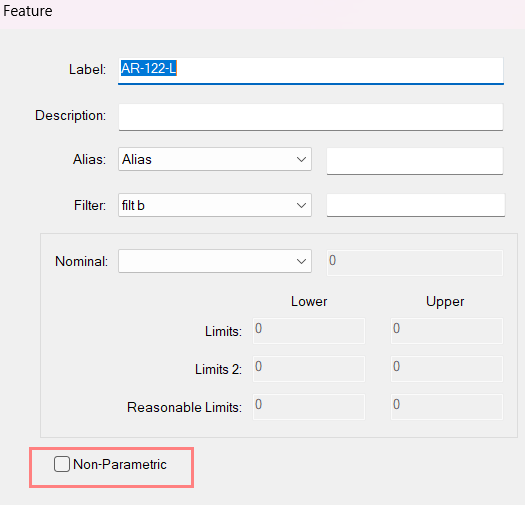
CM4D - Feature Properties
The property dialog for a Feature in CM4D include a check box for the Non-Parametric Statistics flag. Enable this check box to mark the Feature as Non-Parametric.
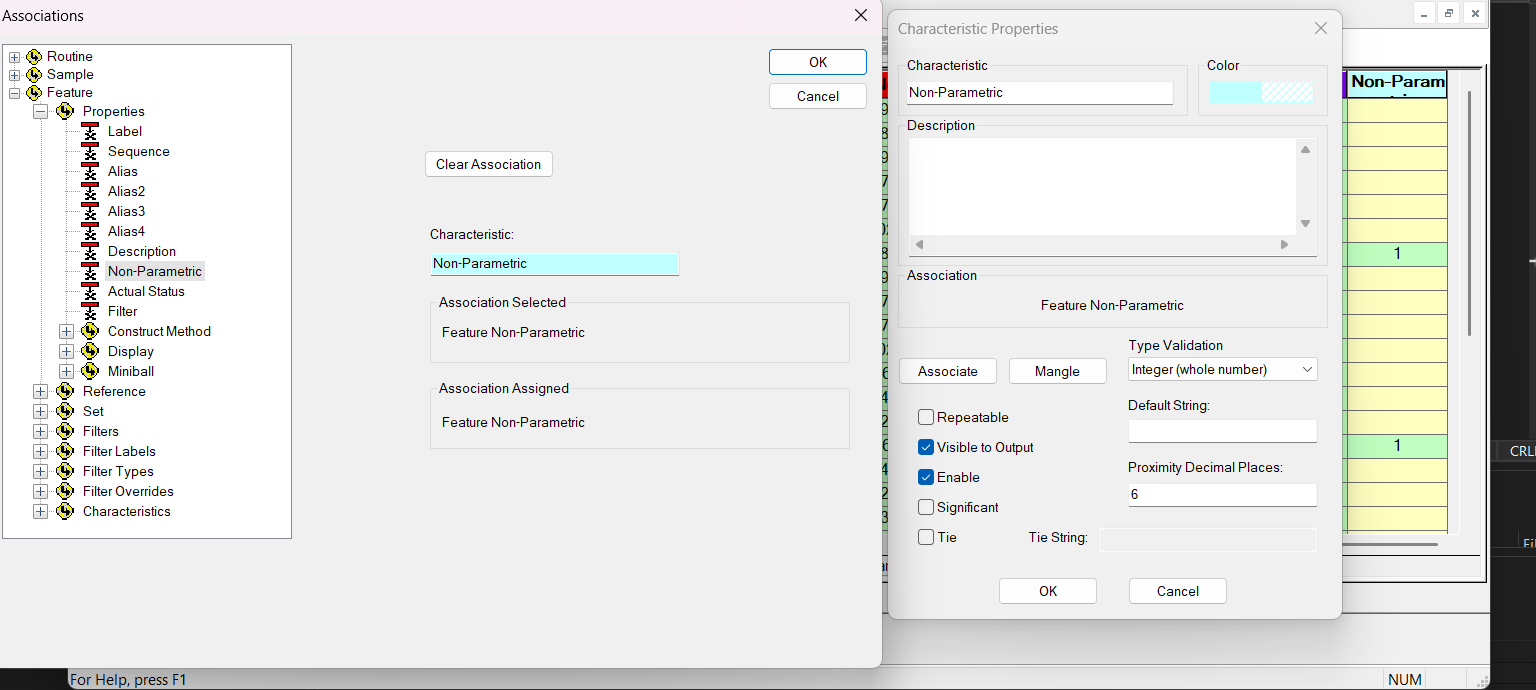
DataSmith - Association
Add the Non-Parametric Statistics Association to the corresponding Feature Characteristic before the data is processed into the database.
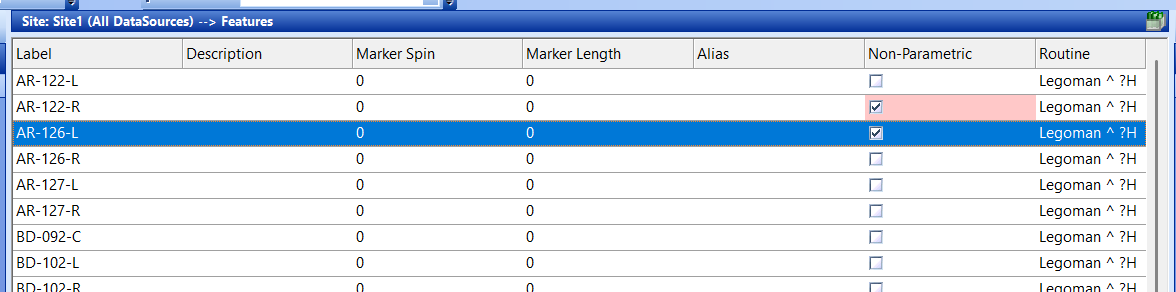
DataUtility - Feature Column
DataUtility Features grid includes a column labelled Non-Parametric Statistics. Add this column to your grid, select one or more Features and then bulk edit the NPS flag.
When the flag is enabled for the first time, a new entry is added in the FeatProp table of the DataSource database. After the Feature Property has been created, setting the flag to TRUE updates the Deleted column to 0 (active). Setting the flag to FALSE updates the Deleted column to 1 (inactive). Because the Feature Property remains in the database, it can be permanently removed using Tools > Remove Deleted menu operation.
DataStack Statistics Methods
The DataStack Statistics options include Overall Capabilty variables which can be used calculate using either calculation method. The variables available in the Statistics dropdown menu follow the same rules as the variables, where the standard variables (~Pp~/~Ppk~) check for the Non-Parametric Statistics flag and the other options are labeled for the calculation method that is used (~Pp,Nd~/~Pp,Iso~).
Related topics:
Can we improve this topic? Click Send Feedback in the upper right of the screen to share your comments!