Returns the state of alignment:
- Aligned - Alignment was successful.
- Failed Align - Alignment failed.
- Not Aligned - Alignment has not been turned on or has not been requested.
- No Subroutine - Alignment can't be applied because alignment requires a subroutine.
Other information related to an alignment may be resolved using variants of the primary ~align~ variable.
~align,a1~
Returns the label of the Feature designated for the A1 characteristic.
~align,a1,featchr~
Returns the axis specified (characteristic) for the A1 Datum.
~align,a1,featoff~
Returns the offset specified for the A1 characteristic.
~align,a1,routhand~
Returns the handedness of the Feature designated for the A1 characteristic.
~align,a1,srchand~
Returns the handedness of the DataSource designated for the A1 characteristic.
~align,a2~
Returns the label of the Feature designated for the A2 characteristic.
~align,a2, featchr~
Returns the characteristic (X, Y or Z) of the A2 datum.
~align,a2,featoff~
Returns the offset specified for the A2 characteristic.
~align,a2,routhand~
Returns the handedness of the Feature designated for the A2 characteristic.
~align,a2,srchand~
Returns the handedness of the DataSource designated for the A2 characteristic.
~align,a3~
Returns the label of the Feature designated for the A3 characteristic.
~align,a3,featchr~
Returns the characteristic (X, Y or Z) of the A3 datum.
~align,a3,featoff~
Returns the offset specified for the A3 characteristic.
~align,a3,routhand~
Returns the handedness of the Feature designated for the A3 characteristic.
~align,a3,srchand~
Returns the handedness of the DataSource designated for the A3 characteristic.
~align,b1~
Returns the label of the Feature designated for the B1 characteristic.
~align,b1,featchr~
Returns the axis specified (characteristic) for the B1 Datum.
~align,b1,featoff~
Returns the offset specified for the B1 characteristic.
~align,b1,routhand~
Returns the handedness of the Feature designated for the B1 characteristic.
~align,b1,srchand~
Returns the handedness of the DataSource designated for the B1 characteristic.
~align,b2~
Returns the label of the Feature designated for the B2 characteristic.
~align,b2,featchr~
Returns the characteristic (X, Y or Z) of the B2 datum.
~align,b2,featoff~
Returns the offset specified for the B2 characteristic.
~align,b2,routhand~
Returns the handedness of the Feature designated for the B2 characteristic.
~align,b2,srchand~
Returns the handedness of the DataSource designated for the B2 characteristic.
~align,c1~
Returns the label of the Feature designated for the C1 characteristic.
~align,c1,featchr~
Returns the axis specified (characteristic) for the C1 Datum.
~align,c1,featoff~
Returns the offset specified for the C1 characteristic.
~align,c1,routhand~
Returns the handedness of the Feature designated for the C1 characteristic.
~align,c1,srchand~
Returns the handedness of the DataSource designated for the C1 characteristic.
~align,isdatum~
If the characteristic is used in an Alignment, then will return the datum specified for the characteristic: A1, A2, A3, B1, B2, C1. If the characteristic is not part of an alignment, nothing will be returned.
~align,isdatum,a1~
The feature is used as a1 in the alignment.
~align,isdatum,a2~
The feature is used as a2 in the alignment.
~align,isdatum,a3~
The feature is used as a3 in the alignment.
~align,isdatum,b1~
The feature is used as b1 in the alignment.
~align,isdatum,b2~
The feature is used as b2 in the alignment.
~align,isdatum,c1~
The feature is used as c1 in the alignment.
~align,isdatum,is,isnt,[char]~
If the feature is used in the alignment for the specified [characteristic], the variable returns the string "is". If the feature is not used in the alignment for the specified [characteristic], the variable returns the string "isnt".
~align,isdatum,yes,no,[char]~
Using the [yes] and [no] parameters with the ~align,isdatum~ variable allows you to replace the strings "is" and "isnt" with text that you choose.
~align,isoffset~
If the characteristic is used in an Alignment, then will return the offset specified for the characteristic: A1, A2, A3, B1, B2, C1. If the characteristic is not part of an alignment, nothing will be returned.
~align,rout~
Returns the label of the subroutine being aligned.
~align,routhand~
Returns the handedness of the routine being aligned.
~align,routine~
Same as ~align,rout~.
~align,routkey~
Returns the routine label plus the routine key filters. This variable can be used as a unique identifier for subroutines.
~align,sampstate~
The state of the alignment mode for a Sample. Will return one of the following: Aligned, NOT Aligned, or FAILED Align.
~align,state~
The state of the alignment mode for a Subroutine. Will return one of the following:
Aligned
NOT Aligned
FAILED Align
Using the [state] parameter with the align variable allows users to replace the strings Aligned, Failed Align, Not Aligned and No Subroutine with text that they choose.
If the variable ~align,state,Yes,No,N/A,Error~ was used, the values Yes, No, N/A and Error would be used in place of the standard value strings.
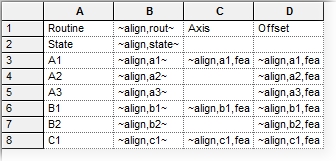
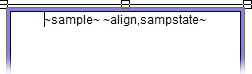
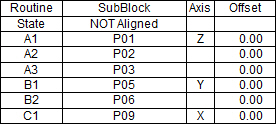
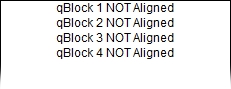
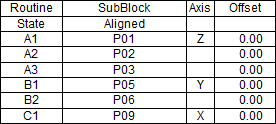
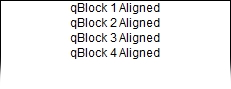
Alignment Variable Examples
Variables in a Table |
Variables in a Text Box |
|
Unresolved Variables |
|
|
|
|
|
Resolved Variables with Alignment Mode OFF |
|
|
|
|
|
Resolved Variables with Alignment Mode ON |
|
|
|
|
Can we improve this topic? Click Send Feedback in the upper right of the screen to share your comments!