After an upgrade, the following routine tasks are recommended:
- Run the Results Database Utility. This checks for any new or updated stored procedures and will perform any changes to the Results database. This utility does not change your data.
- Run the Site Database Utility and Datasource Database Utility. These utilities should only be run for CM4D version upgrades with a Schema change.
v25.2 - Hot Fix 2
ATS Licensing FIPS Support
CM4D licensing is now compliant with FIPS (Federal Information Processing Standards) regulations.
Requires ATS Licensing Server 4. If you are running the ATS Licensing WCF Host Communicator service, see here for the required configuration setting.
Bug Fixes
| Ticket # | Issue | Notes |
| INC58859 | Uncross leader line function is not working as expected | |
| INC61566 | Leader lines are crossed when check for Uncross Leader line in CM4D Classic | Resolution: The cause of this bug is fixed for new documents going forward, but you may have saved documents that still show the original problem after the upgrade. To fix one of these documents: 1. Select all annotations on the sheet 2. Right-click and select Report Tweak > Uncross from the menu (do not create a new ReportTweak report). 3. Save the document. |
| INC65185 | Leader lines are not showing for first sheet after auto report until you switch to other sheets | |
| INC65262 | Modifying [a Restricted] sample filter in CM4D-Interactive [is allowed] | |
| INC65415 | [Process Change] Log does not work when adding features via 3D view to subroutine or reference feature. | |
| INC65768 | Site Manager - Incorrect Results Export informative message | Resolution: Message warning about database inaccessibility is no longer relevant with current Results command queues. |
| INC66657 | View Orientation not recalled on loading a saved view to a sheet - View Orientation of any 3D CAD model does not save correctly. If the orientation/angle of CAD is changed and saved to a view and then loaded to a CM4D document, the orientation falls back to the original angle rather than the changed angle. | |
| INC70570 | DataSmith Batch Intermittent Issue. DataSmith Batch sends data files to ErrBox randomly giving an Unhandled error in OutputToDatabase() error. | |
| INC70648 | 3D Model disappears while using Interactive | |
| INC71598 | While editing a View in CM4Di, moving the CAD model with the right-click button while exiting Edit Mode leaves the model stuck to the mouse movements. | |
| INC71661 | Different appearance on annotation when print to Clipboard from CM4D (interactive) | |
| INC71664 | Default position on the CAD model in the template (report pages opened in CM4D Classic) does not reflect selected position in the CM4D Interactive. | |
| INC72476 | CM4Di: Printing causes disappearing of Model | |
| INC73126 | Export data from CM4D-Interactive in "DataSource into DMIS Statement" does not export SMI Type "Surf" to the dmo file. | |
| INC73343 | CAD model has blue background when print as array from CM4D interactive | |
| INC73560 | Issue with the information that is presented in CM4D and Result db | Solution: Refer to Decimal Places in the topic Configuring the Results Services. |
| INC74463 | Disabled [Results] Datasource created entries in ResultsExportCommandQueue table | Resolution: Data payloads for disabled Results dbs or excluded Routines are automatically assigned 'Status 2' in the RECQ table. |
| INC74879 | Feature marker disappear after returning back from Drilldown | |
| INC75381 | Snapshot quality setting mismatch with saved file size | |
| INC75778 | CM4D scheduler Dynamic job event trigger with sample filter enabled does not work | |
| INC81275 | Difference in decimal places of values in cm4d datasource and results DB affects tolerance criteria | Solution: Refer to Decimal Places in the topic Configuring the Results Services. |
| Hole and Slot Feature Markers contain Surf marker | ||
| Reverse values after upgrade | ||
| Time Zone mismatch in Baseline FK/PK columns in Results database | ||
| Unstable results database transfer | Solution: Refer to the sections about Recoverability and Job Batch Size in the topic Configuring the Results Services. |
v25.2 - Hot Fix 1
Results Services Settings
To support custom deployments of the Results Services, some options were added to the appsettings file. Some of these settings are specific to the type of Transport you are using with the services, e.g. Azure Storage Queues.
See the topic Configuring the Results Services for more details.
| Ticket # | Issue | Notes |
| INC64130 | Azure Storage Queue too large. Received the following message in Event Viewer: Azure.RequestFailedException: The request body is too large and exceeds the maximum permissible limit. | Solution: Refer to Enable Compression in the topic Configuring the Results Services. |
| INC64392 | Sticky report does not create after first creation in Interactive | Resolution: Save As menu option is disabled for CM4Di when a Sticky Report is active. |
| INC66710 | StreamCacheSmith Timeout for Azure queues with .jt models | Solution: Refer to Azure Queue Invisible Time in the topic Configuring the Results Services. |
| INC71310 | Feature Label Details are not captured in Site database. | Resolution: Optionally enable the deprecated Event Scope for DataSet Events to capture more information about the triggering data. Refer to Event Coverage (for DataSets) in the topic CM4D.ini - Defaults. |
| Results Sender error when exporting database | ||
| Feature Marker properties are missing in API | Marker Mode, Resolution, Scale and Use Auto Scale. See the topic QaView for these and other related functions. |
Known Issues
The following are minor known issues specific to this version of which you may want to be aware. These issues will likely be addressed in a subsequent patch release.
| Area | Known Issue | Notes |
| StreamCacheSmith |
The StreamCacheSmith service does not start (process was terminated due to an unhandled exception). |
Workaround: Modify the appsettings file for the service and add TransactionMode: ReceiveOnly to the Transport section. In future versions, this setting will be included in the appsettings file by default. Refer to Transport in the topic Configuring the Results Services. |
v25.2 - New Features
This version requires a schema update to the CM4D Site (25e) and Results databases.
CM4D Peruse Enhancements
Home Page Routine Filters
Filters are now available on the starting page of CM4D Peruse. At this time, buttons are displayed for any configured Routine filters.
See the topic Home Page to review the functionality.
Graph Annotation
Annotation templates used for the Annotation Sets introduced in the previous version have been expanded to support some graph types. Additionally, the annotation templates are now used as Reports.
See the following topics to review the functionality:
Peruse Users - Report Panel
Peruse Admins - Peruse Report Configuration
CM4D Variable Support
The CM4D variables supported for use in CM4D Peruse annotations has been expanded to include nearly all CM4D variables, with a few exclusions.
See the topic Peruse Annotation Template Variables to see the complete list.
Subroutine Support for 3D Models
Subroutine information stored in the Results database now includes references to any 3D models associated to its parent Routine(s). Duplicate models are not generated or stored.
Updated User Interface
The appearance of CM4D Peruse has received a cosmetic update to make the interface more visually pleasing with better contrast. Two themes are available for the user to select a preference, either Light or Dark.
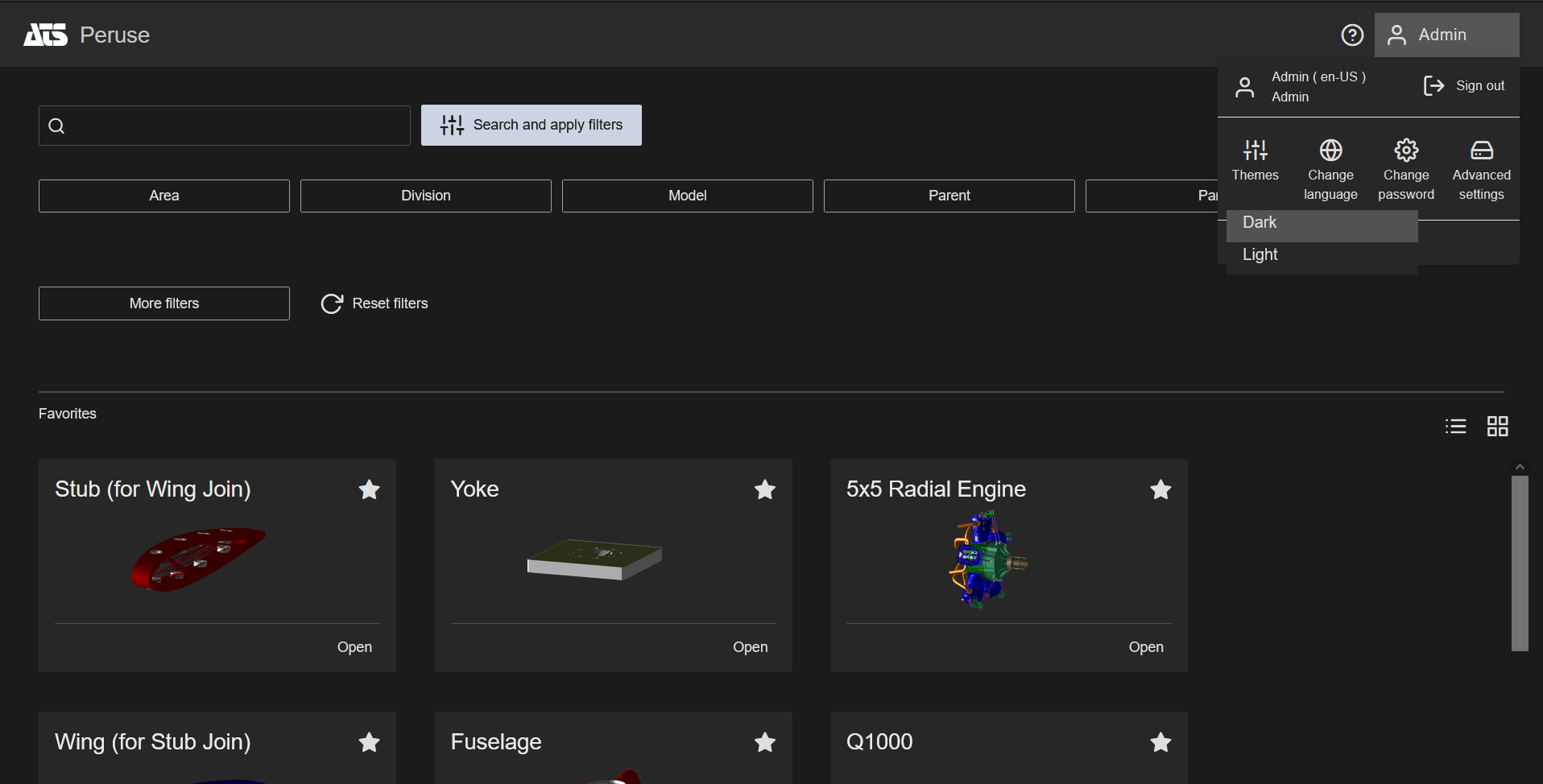
Dark Theme |
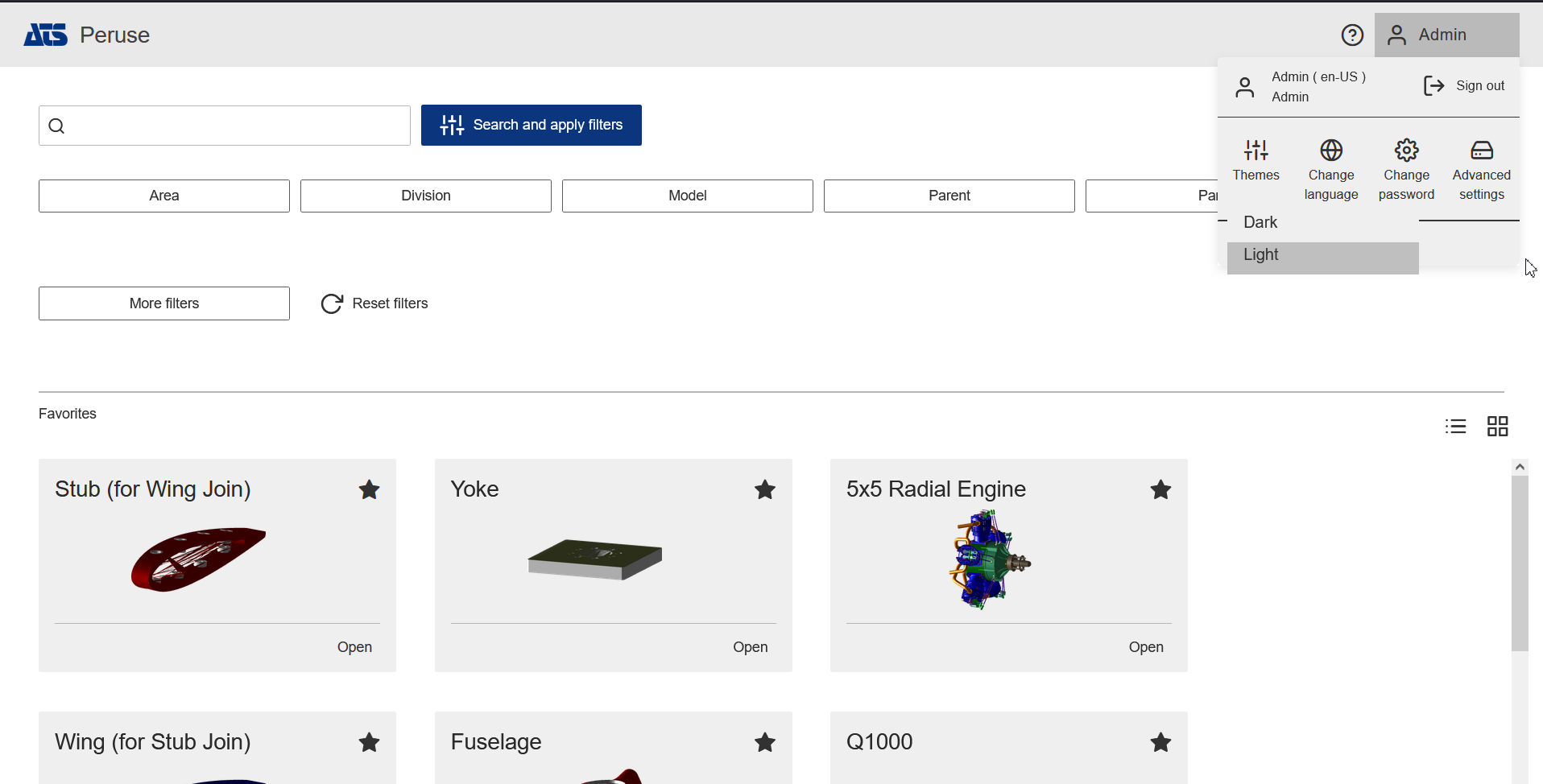
Light Theme |
See the topic Peruse User Options to review the functionality.
Spectrum Functionality Restored
Original CM4D functionality, View Spectrum, is returned using the HOOPS 3D engine upgraded in the initial release of v25. While most of the configuration options have returned as they were in v24 and earlier, the arrow type 'Label' has been deprecated.
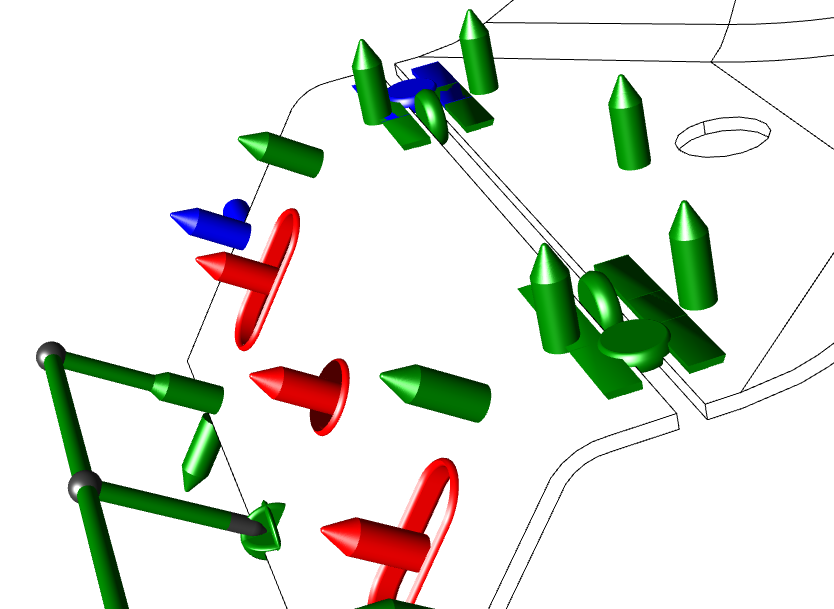
Spectrum Type: Color with multiple Feature Types (Feature Mode - Feature Specific) |
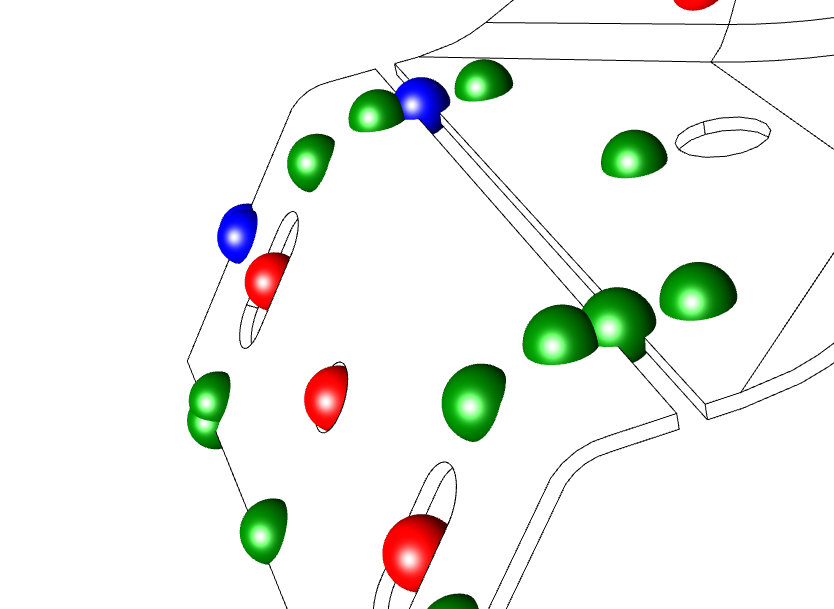
Spectrum Type: Color with multiple Feature Types (Feature Mode - Sphere) |
See the topic Spectrum to review the functionality.
Results Database - Exclude Routines by Label or Routine Filter
A configuration option has been added to CM4D Managed DataSources in the CM4D Configuration plugin which allows you to select which Routines, if any, are to be completely excluded from the data transfer. In addition to selecting Routines by label, you can use Filter arguments to designate Routines for exclusion. The filter builder is only available if the selected Managed DataSource has Routine Filters configured.
See the topic Configure Results Exclusions to review the functionality.
Results Services - Specify Managed DataSource
The Results Sender service processes the database changes in CM4D for export. Distributed installations with databases in different regions that are organized within a single Site may cause inefficiencies. For example, if a Results Sender service in Europe processes changes for a database in Asia. A configuration option is now available which allows you to restrict a Results Sender instance to process only specified Managed Datasources. It is possible to configure a datasource by DataSource label or to specify a Site and include all Datasources within that Site. The Results Sender appsettings.json file has a configuration setting "ProcessDatasources" that takes an array of definitions.
See the topic Results Services to review the functionality.
Security and Configuration Manager Enhancements for CM4D Databases
Some enhancements have been added to the CM4D Configuration plugin.
Synchronize Users, Groups and Access Privileges with Site Manager
A tab has been added to the Site Settings section of the CM4D Configuration plugin which lets you synchronize security and user information between ATS Security Manager and CM4D Site Manager. The synchronized data includes users, roles (groups) and rights (privileges).
See the topic Site Management - Site Settings to review the functionality.
Generate New or Update Databases
The three database types used by CM4D - Site, CM4D, Results - have some degree of automation available when managed via the CM4D Configuration plugin. Each of these database types have options for both creating new databases or updating existing databases to the latest schema.
Alternately, you may choose to run the update scripts manually in SSMS (legacy method) or run the corresponding Database Utility (new - see next section).
See the following topics to review the functionality:
Site Management - Managed DataSources
Site Management - Results Database
Database Utilities
Creating and updating databases for CM4D can be a lengthy process when done manually, so we have provided tools with the CM4D Server and CM4D Results Services installers to make this type of database maintenance easier. Instead of locating the scripts and running each script individually on each database (and in the right order), you can simply run each tool and select an action.
- Create or Upgrade a Site Database - Use for new installations or version upgrades.
- Create or Upgrade a CM4D Database - Use for new installations, version upgrades, or creating additional databases.
- Create or Upgrade a Results Database - Use for new installations or version upgrades.
- Replace Database GUIDs - Use after copying a database (i.e., restoring a backup).
- Generate User Roles - Use to pull user/group information from the CM4D Site database for transfer into ATS Security.
See the topic Database Utilities to review the functionality.
Docker Image Support for the following CM4D Services
The following ATS CM4D modules support Windows or Linux Docker deployments:
- CM4D Configuration Plugin and CM4D API
- CM4D Peruse
- CM4D Results Services (Results Sender, Results Loader, StreamCacheSmith)
- CM4D Upload Portal (Upload Portal, DataSmith Translator)
The available docker images can be found on the ATS Product repository on Docker Hub.
See the topic Docker Installations to review the functionality.
EventSmith SMTP V2
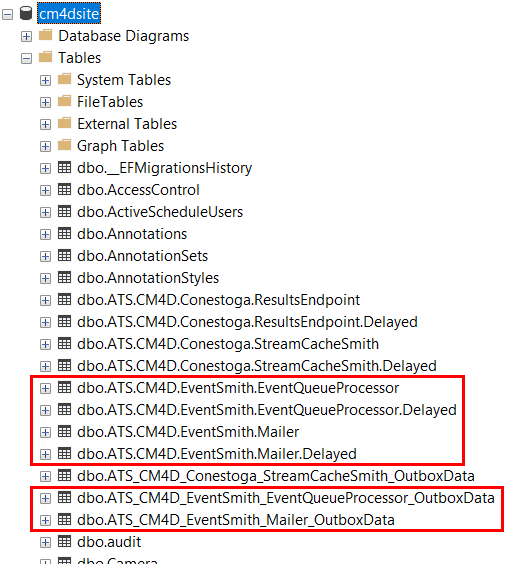
EventSmith SMTP has been upgraded to a separate installer and now supports password encryption by using NServicebus with SQL Transport infrastructure with queue tables created by the services in the Site database. The new EventSmith services (EventSmith Mailer and EventSmith Queue Processor) are a separate installer in order to allow for flexible deployments. CM4D creates event entries in the table EventQueue in the Site database, which are then picked up by the EventSmith services for processing through the Processing Queue and Mailer tables.
Upgrade Steps:
- Stop CM4D Services, particularly EventSmith SMTP and DataConnect.
- Uninstall CM4D Server.
- Install CM4D Server v25.2.
- Install EventSmith SMTP V2.
- Run Site Manager and check the SMTP Settings. If using SSL, the Authentication user name format should be the user name only (e.g., mjones), without either domain (e.g., ats-global\mjones) or email (e.g., [email protected]) formatting. This format requirement is a temporary Known Issue and will be fixed in a subsequent hot patch.
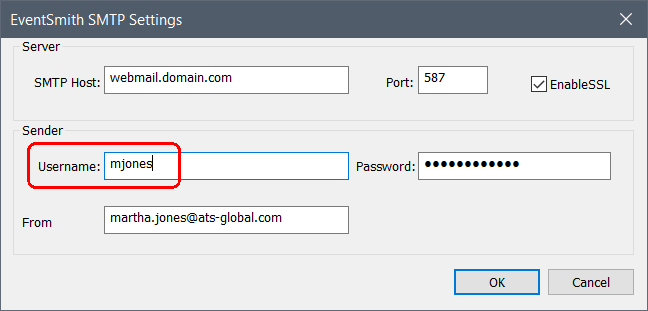
- Optionally, depending on your setup, configure the new EventSmith Services (Mailer and Queue Processor) to run as your preferred user (e.g., cm4d_service).
- Start the EventSmith Services.
- Check the CM4D Site database for 6 new tables.
See also:
Known Issues - SMTP_Mail_Server_Authentication_Username.
v25.2 - Fixed Bugs
| Ticket # | Issue | Notes |
| INC54241 | Classic and Interactive show a different 'Last Sample'. | |
| INC31603 | CM4D Classic Cpk score anomaly | |
| INC54563 | CM4D Interactive does not properly refresh the pages when switching active sample. | |
| INC33975 | CM4Di Feature Grid Show All Rows does not work when you first use keep selected for some features | |
| INC31102 | CM4Di sample label loses | The reported issue was primarily a setup issue. A conformance summary with "Evaluate on current process only" makes sense only if the features have the same baseline setup. In the reported case, the features with 'missing' sample labels had a different baseline. Fixing the definition of the report solves the problem. but this version contains a modification that displays Sample labels even in cases where "Evaluate current process only" is used in the setup. |
| INC31650 | DataSmith loses last line for Excel data | |
| INC49759 | Orphans get generated | |
| INC37335 | Auto Resize Image View in CM4Di | |
| INC33978 | When unchecked Unload Last Query to Save Memory not restoring the settings done for the previous routine | |
| DataUtility toolbar DataSource button disappears | Support for DataUtility was added to the Reset BarState command line.
See Reset Bar State. |
|
| EventSmith settings files are not encrypted. | Solution: See New Feature - EventSmith SMTP V2 |
See here to see the release notes for previous versions.